
Hush Touch | Voice-to-Text for MacOS vs Z Image Turbo
Side-by-side comparison to help you choose the right AI tool.

Hush Touch | Voice-to-Text for MacOS
Hush Touch is offline voice-to-text for Mac that learns your vocabulary for twenty dollars.
Last updated: February 28, 2026

Z Image Turbo
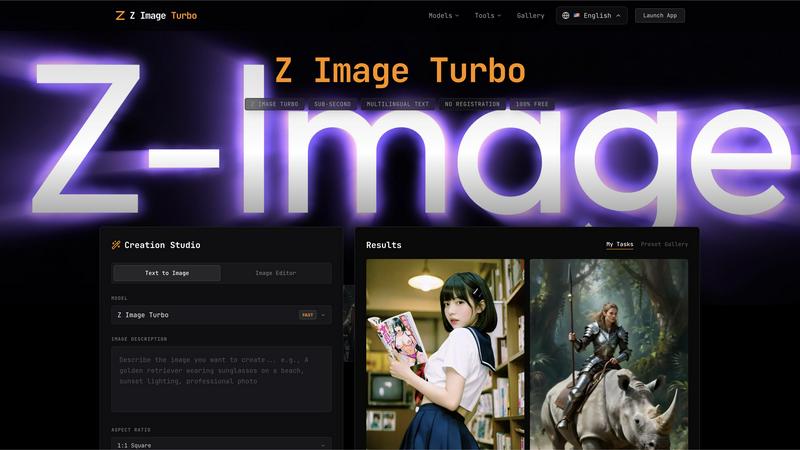
Z Image Turbo generates stunning 4K images in under one second with multilingual support, all completely free.
Last updated: February 27, 2026
Visual Comparison
Hush Touch | Voice-to-Text for MacOS

Z Image Turbo
Feature Comparison
Hush Touch | Voice-to-Text for MacOS
Dual-Engine On-Device Recognition
Hush Touch leverages two core Apple dictation engines simultaneously for superior accuracy. The primary engine handles natural speech flow and punctuation, while a secondary engine acts as a dedicated spotter for your custom vocabulary. The outputs are then blended and refined with a final Apple Intelligence pass, all processed locally on your Mac. This unique architecture ensures technical terms, brand names, and niche jargon are recognized correctly without ever leaving your device.
Adaptive Custom Vocabulary & Learning
The app supports a library of 500 custom terms and features intelligent auto-learning. When you manually correct a transcription, Hush Touch detects this and automatically adds the right word to your personal vocabulary. It also employs frequency-weighted language models and can create per-app profiles, meaning it learns the specific terminology you use in different applications, continuously improving its accuracy for your unique workflow.
Smart Text Processing & Context Modes
Beyond basic transcription, Hush Touch includes powerful local processing to polish your text in real-time. It automatically removes filler words like "um" and "ah," offers auto-correction for common slips, and can format numbered lists from your speech. You can switch between four context modes—General, Email, Code, and Notes—to optimize recognition for different types of content, ensuring the right tone and formatting.
Fully Hands-Free Operation & Privacy
Designed for seamless workflow integration, Hush Touch enables completely hands-free use. You can start dictation with a global hotkey or by saying "Hey Siri, start touch." It auto-inserts text after a pause and can auto-stop with a hotkey double-click. You can even send messages by voice with commands like "okay send message." Crucially, every feature operates with 100% on-device privacy, with zero data collection, cloud dependency, or subscription tracking.
Z Image Turbo
Sub-Second Generation
Z Image Turbo boasts an optimized inference pipeline that allows users to generate photorealistic images in under one second. This remarkable speed is achieved through an advanced 8-step diffusion process, making it ideal for users who require immediate results without sacrificing quality.
Accurate Multilingual Text Rendering
One of the standout features of Z Image Turbo is its ability to render text accurately in over 10 languages, including English and Chinese. This functionality is perfect for creating marketing materials, posters, and book covers without the worry of garbled letters or incorrect translations.
Consistent Character Identity
Z Image Turbo ensures that character identities remain consistent across multiple generations. This feature is particularly beneficial for storytellers and brands that rely on recognizable mascots or characters, allowing them to maintain the same look and style in various contexts.
Precise Camera Control
With Z Image Turbo, users have full control over virtual camera parameters, including depth of field and angle settings. The platform offers over 50 lens simulations, enabling creators to achieve the desired composition, lighting, and overall look for their images with precision.
Use Cases
Hush Touch | Voice-to-Text for MacOS
Drafting Professional Emails & Communications
Compose clear, polished emails and messages without touching the keyboard. Speak naturally to draft lengthy responses, and use voice commands to send them directly. The Email context mode helps format your correspondence appropriately, while on-device processing guarantees sensitive business information never leaves your computer, maintaining confidentiality.
Creating Detailed Notes & Documentation
Ideal for students, researchers, and professionals like physicians or lawyers who need to capture complex information quickly. Dictate detailed meeting notes, medical observations, or research summaries. The custom vocabulary learning ensures specialized terminology is captured accurately every time, turning spoken ideas into structured text effortlessly.
Writing Long-Form Content & Reports
Authors, journalists, and content creators can overcome writer's block and increase productivity by dictating drafts, articles, or reports. The natural flow and punctuation handling allow for expressive, fluid dictation sessions. The filler word removal and smart polishing create a cleaner first draft, saving significant editing time later.
Coding & Technical Writing
Developers and technical writers can use the dedicated Code mode to dictate code snippets, comments, or technical documentation. The enhanced vocabulary recognition is crucial for accurately capturing programming languages, framework names, and command-line tools, making it a valuable tool for hands-free coding or documenting complex systems.
Z Image Turbo
Marketing and Advertising
Businesses can leverage Z Image Turbo to create eye-catching marketing visuals in minutes. From promotional banners to product shots, the platform's speed and multilingual capabilities make it an invaluable tool for marketers looking to engage a diverse audience.
Character Design and Development
Artists and game developers can use Z Image Turbo to generate consistent character designs quickly. Whether for animation, gaming, or comics, the tool helps maintain character fidelity across various scenes, streamlining the creative process.
Social Media Content Creation
Content creators can utilize Z Image Turbo to produce high-quality images for their social media platforms. With the ability to generate images in various styles and formats, users can keep their feeds fresh and engaging without investing significant time.
Educational and Presentational Materials
Educators and professionals can create visually appealing presentations and educational materials using Z Image Turbo. The tool's accurate text rendering and diverse style options allow users to produce materials that are both informative and visually captivating.
Overview
About Hush Touch | Voice-to-Text for MacOS
Hush Touch is a refined voice dictation tool built exclusively for macOS, designed for those who value privacy, precision, and performance. It transforms spoken words into clean, accurate text entirely on your Mac, eliminating any reliance on cloud servers or internet connectivity. This on-device approach ensures your conversations, notes, and drafts remain completely private while delivering a fast, responsive experience. The app intelligently combines two native Apple transcription engines with a final Apple Intelligence pass to produce text that feels naturally written, not just transcribed. It learns your personal vocabulary over time, removes filler words, and adapts to different writing contexts. For professionals, writers, students, or anyone who types frequently, Hush Touch offers a smarter, more secure way to draft emails, messages, documents, and notes hands-free, all for a single, one-time payment.
About Z Image Turbo
Z Image Turbo is a cutting-edge AI image generation tool designed to create stunning, high-quality 4K photorealistic images in mere seconds. It stands out in the competitive landscape of image generators by offering sub-second rendering capabilities, which is ten times faster than many alternatives. Whether you are a marketer, content creator, or simply someone who appreciates high-quality visuals, Z Image Turbo caters to your needs by allowing you to generate images without any registration or costs. With advanced models like GPT Image 1.5, Flux 2, and Seedream 4.5, users can experiment with various styles and formats, ensuring that they receive tailor-made visuals that meet their specific requirements. The platform's multilingual text rendering capabilities enhance its usability for global audiences, making it the perfect choice for anyone looking to create professional-grade images quickly and efficiently.
Frequently Asked Questions
Hush Touch | Voice-to-Text for MacOS FAQ
How does Hush Touch work offline?
Hush Touch is architected for complete offline functionality. It uses Apple's native speech recognition engines (DictationTranscriber and SFSpeechRecognizer) which are built into macOS, along with an on-device Apple Intelligence pass. All audio processing, transcription, vocabulary matching, and text polishing happen locally on your Mac, requiring no internet connection at any point.
What is the custom vocabulary and how does auto-learn work?
You can add up to 500 custom words, phrases, or technical terms like "Kubernetes" or brand names. The auto-learn feature activates when you manually correct a word in the transcribed text. Hush Touch detects this correction and automatically adds the right spelling to your personal vocabulary, training itself to recognize that term correctly in future dictation sessions.
Can I use Hush Touch hands-free?
Yes, Hush Touch supports fully hands-free operation. You can activate it by saying "Hey Siri, start touch." Once dictating, the app will automatically insert the transcribed text into your active window after a short pause (approximately 2 seconds of silence). You can also configure it to send messages or perform actions with custom voice command phrases.
How does Hush Touch compare to cloud-based alternatives?
Hush Touch prioritizes privacy, cost-effectiveness, and offline reliability. Unlike cloud-based services, it never sends your voice data to external servers. It is a one-time purchase versus a recurring monthly subscription, saving significant money over time. While it uses sophisticated on-device AI, its performance is dependent on your Mac's capabilities rather than internet speed or cloud latency.
Z Image Turbo FAQ
What types of images can I generate with Z Image Turbo?
Z Image Turbo allows you to create a wide range of images, including photorealistic visuals, illustrations, character designs, and more. You can choose from over 50 styles to suit your needs.
Do I need to register to use Z Image Turbo?
No, Z Image Turbo is completely free to use, and there is no registration required. You can start generating images immediately after accessing the platform.
Is there a limit to the number of images I can create?
Z Image Turbo does not impose any limits on the number of images you can generate. You can create as many images as you want, allowing for endless creative possibilities.
What formats can I export my images in?
You can export your generated images in multiple formats, including PNG, JPG, and WebP. This flexibility ensures that your images are ready for various applications, from web use to print.
Alternatives
Hush Touch | Voice-to-Text for MacOS Alternatives
Hush Touch | Voice-to-Text for MacOS is a premium dictation tool that prioritizes privacy and seamless integration. It operates entirely offline, using Apple's on-device transcription and intelligence to deliver clean, accurate text directly into your writing workflows. This places it in the category of AI-powered productivity and writing assistants. Users may explore alternatives for various reasons. Some seek free or subscription-based models, while others require cross-platform compatibility beyond macOS. Specific feature needs, like advanced command integration or support for specialized vocabulary, can also prompt a search for different solutions. When evaluating other options, key considerations include privacy policies regarding data processing, the accuracy and natural flow of the transcribed text, and how well the tool integrates into your daily computer use. The ideal choice balances these factors with your budget and specific workflow requirements.
Z Image Turbo Alternatives
Z Image Turbo is an innovative AI image generator that specializes in creating high-quality 4K photorealistic images in mere seconds. As part of the AI Assistants and Tech Tools category, it stands out for its multilingual text rendering capabilities, allowing users to generate images without the need for registration. However, users often seek alternatives to Z Image Turbo for various reasons, including specific feature sets, pricing structures, or compatibility with different platforms. When exploring alternatives, it is essential to consider factors such as image quality, ease of use, and the overall versatility of the tool to ensure it meets your unique creative needs.