
Hush Touch | Voice-to-Text for MacOS vs StudyPal
Side-by-side comparison to help you choose the right AI tool.

Hush Touch | Voice-to-Text for MacOS
Hush Touch is offline voice-to-text for Mac that learns your vocabulary for twenty dollars.
Last updated: February 28, 2026

StudyPal
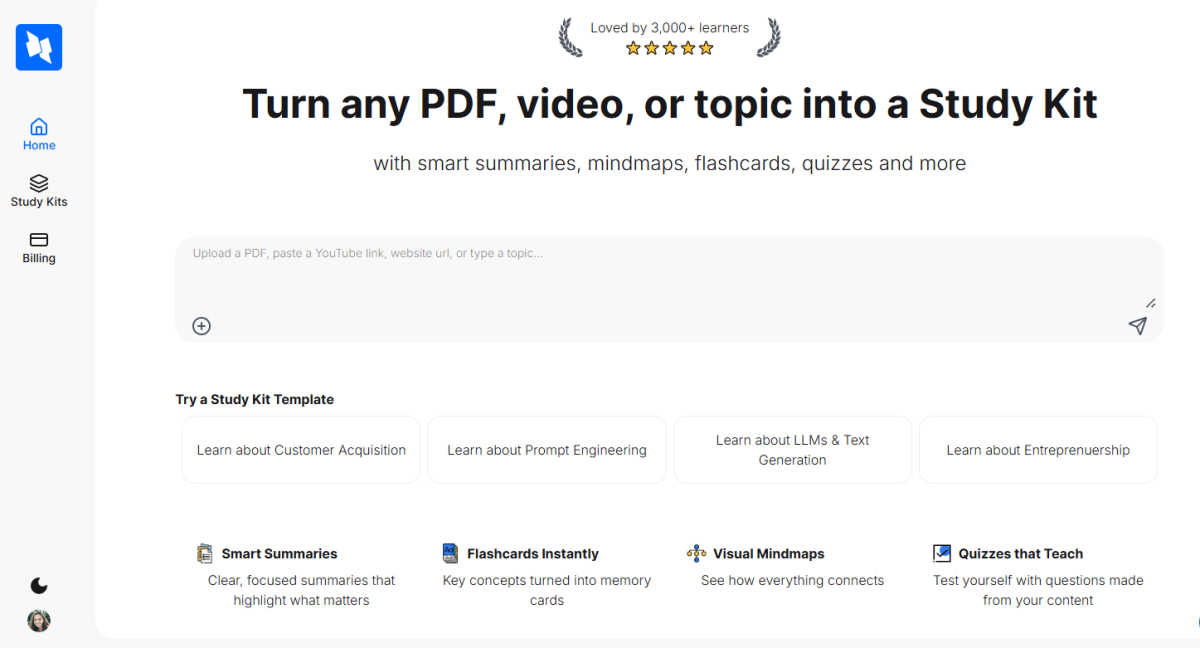
StudyPal transforms PDFs and videos into engaging study kits with summaries, flashcards, quizzes, and mindmaps.
Last updated: March 1, 2026
Visual Comparison
Hush Touch | Voice-to-Text for MacOS

StudyPal
Feature Comparison
Hush Touch | Voice-to-Text for MacOS
Dual-Engine On-Device Recognition
Hush Touch leverages two core Apple dictation engines simultaneously for superior accuracy. The primary engine handles natural speech flow and punctuation, while a secondary engine acts as a dedicated spotter for your custom vocabulary. The outputs are then blended and refined with a final Apple Intelligence pass, all processed locally on your Mac. This unique architecture ensures technical terms, brand names, and niche jargon are recognized correctly without ever leaving your device.
Adaptive Custom Vocabulary & Learning
The app supports a library of 500 custom terms and features intelligent auto-learning. When you manually correct a transcription, Hush Touch detects this and automatically adds the right word to your personal vocabulary. It also employs frequency-weighted language models and can create per-app profiles, meaning it learns the specific terminology you use in different applications, continuously improving its accuracy for your unique workflow.
Smart Text Processing & Context Modes
Beyond basic transcription, Hush Touch includes powerful local processing to polish your text in real-time. It automatically removes filler words like "um" and "ah," offers auto-correction for common slips, and can format numbered lists from your speech. You can switch between four context modes—General, Email, Code, and Notes—to optimize recognition for different types of content, ensuring the right tone and formatting.
Fully Hands-Free Operation & Privacy
Designed for seamless workflow integration, Hush Touch enables completely hands-free use. You can start dictation with a global hotkey or by saying "Hey Siri, start touch." It auto-inserts text after a pause and can auto-stop with a hotkey double-click. You can even send messages by voice with commands like "okay send message." Crucially, every feature operates with 100% on-device privacy, with zero data collection, cloud dependency, or subscription tracking.
StudyPal
Smart Summaries
StudyPal offers clear, focused summaries that highlight the most important information from your materials. These intelligent summaries condense complex topics into digestible insights, enabling you to grasp essential concepts quickly.
Flashcards Instantly
Transform key concepts into memory cards with StudyPal’s instant flashcard feature. These flashcards make studying more efficient, allowing users to review important terms and definitions on-the-go, reinforcing knowledge retention.
Visual Mindmaps
StudyPal’s visual mind maps provide a graphical representation of how concepts connect and relate to each other. This feature assists in organizing thoughts and enhancing comprehension, making it easier to visualize complex subjects.
Quizzes that Teach
Test your understanding with auto-generated quizzes crafted from your study materials. These quizzes not only reinforce what you have learned but also provide immediate feedback to help identify areas that need further review.
Use Cases
Hush Touch | Voice-to-Text for MacOS
Drafting Professional Emails & Communications
Compose clear, polished emails and messages without touching the keyboard. Speak naturally to draft lengthy responses, and use voice commands to send them directly. The Email context mode helps format your correspondence appropriately, while on-device processing guarantees sensitive business information never leaves your computer, maintaining confidentiality.
Creating Detailed Notes & Documentation
Ideal for students, researchers, and professionals like physicians or lawyers who need to capture complex information quickly. Dictate detailed meeting notes, medical observations, or research summaries. The custom vocabulary learning ensures specialized terminology is captured accurately every time, turning spoken ideas into structured text effortlessly.
Writing Long-Form Content & Reports
Authors, journalists, and content creators can overcome writer's block and increase productivity by dictating drafts, articles, or reports. The natural flow and punctuation handling allow for expressive, fluid dictation sessions. The filler word removal and smart polishing create a cleaner first draft, saving significant editing time later.
Coding & Technical Writing
Developers and technical writers can use the dedicated Code mode to dictate code snippets, comments, or technical documentation. The enhanced vocabulary recognition is crucial for accurately capturing programming languages, framework names, and command-line tools, making it a valuable tool for hands-free coding or documenting complex systems.
StudyPal
Exam Preparation
Students can utilize StudyPal to prepare for exams by converting their lecture notes, textbooks, and other study materials into cohesive study kits, ensuring a thorough understanding of the topics.
Professional Development
Professionals can leverage StudyPal to upskill by transforming industry-related articles, videos, and courses into interactive study kits, allowing for efficient learning in their respective fields.
Personal Learning
Lifelong learners can explore new topics by inputting any subject matter into StudyPal, receiving structured study kits that help them grasp new concepts in an engaging and interactive way.
Collaborative Learning
StudyPal can be used in group study sessions where multiple users can input resources and collaboratively create study kits, fostering teamwork and collective knowledge acquisition.
Overview
About Hush Touch | Voice-to-Text for MacOS
Hush Touch is a refined voice dictation tool built exclusively for macOS, designed for those who value privacy, precision, and performance. It transforms spoken words into clean, accurate text entirely on your Mac, eliminating any reliance on cloud servers or internet connectivity. This on-device approach ensures your conversations, notes, and drafts remain completely private while delivering a fast, responsive experience. The app intelligently combines two native Apple transcription engines with a final Apple Intelligence pass to produce text that feels naturally written, not just transcribed. It learns your personal vocabulary over time, removes filler words, and adapts to different writing contexts. For professionals, writers, students, or anyone who types frequently, Hush Touch offers a smarter, more secure way to draft emails, messages, documents, and notes hands-free, all for a single, one-time payment.
About StudyPal
StudyPal is an innovative AI-powered study companion crafted to revolutionize the learning experience. It addresses the common challenges of manual note-taking and organizing study materials by transforming existing resources into interactive study kits. With StudyPal, users can effortlessly input a PDF document, a YouTube video link, or a specific topic, and the platform intelligently processes this content into a comprehensive learning suite. This suite encompasses smart summaries that distill essential information, visual mind maps that illustrate connections, engaging flashcards for quick recall, auto-generated quizzes for self-assessment, and curated video recommendations tailored to enhance understanding. Designed for students preparing for high-stakes exams, professionals looking to upskill, and lifelong learners exploring new subjects, StudyPal adapts to individual learning needs. By promoting active recall through diverse formats, it significantly boosts knowledge retention and saves valuable study time, making personalized learning accessible anytime and anywhere.
Frequently Asked Questions
Hush Touch | Voice-to-Text for MacOS FAQ
How does Hush Touch work offline?
Hush Touch is architected for complete offline functionality. It uses Apple's native speech recognition engines (DictationTranscriber and SFSpeechRecognizer) which are built into macOS, along with an on-device Apple Intelligence pass. All audio processing, transcription, vocabulary matching, and text polishing happen locally on your Mac, requiring no internet connection at any point.
What is the custom vocabulary and how does auto-learn work?
You can add up to 500 custom words, phrases, or technical terms like "Kubernetes" or brand names. The auto-learn feature activates when you manually correct a word in the transcribed text. Hush Touch detects this correction and automatically adds the right spelling to your personal vocabulary, training itself to recognize that term correctly in future dictation sessions.
Can I use Hush Touch hands-free?
Yes, Hush Touch supports fully hands-free operation. You can activate it by saying "Hey Siri, start touch." Once dictating, the app will automatically insert the transcribed text into your active window after a short pause (approximately 2 seconds of silence). You can also configure it to send messages or perform actions with custom voice command phrases.
How does Hush Touch compare to cloud-based alternatives?
Hush Touch prioritizes privacy, cost-effectiveness, and offline reliability. Unlike cloud-based services, it never sends your voice data to external servers. It is a one-time purchase versus a recurring monthly subscription, saving significant money over time. While it uses sophisticated on-device AI, its performance is dependent on your Mac's capabilities rather than internet speed or cloud latency.
StudyPal FAQ
How does StudyPal process content?
StudyPal employs advanced AI algorithms to analyze and extract key information from input resources, transforming them into interactive study kits tailored to your learning needs.
Can I use StudyPal for different subjects?
Absolutely! StudyPal is versatile and can handle a wide array of subjects, making it an ideal study companion for students and professionals alike.
Is there a limit to the types of resources I can use?
No, StudyPal accepts a variety of resources including PDFs, YouTube video links, and even specific topics, providing flexibility in how you create your study kits.
How does the AI tutor feature work?
The built-in AI tutor provides instant, clarifying answers to your specific questions, helping you understand complex concepts and enhancing your overall learning experience.
Alternatives
Hush Touch | Voice-to-Text for MacOS Alternatives
Hush Touch | Voice-to-Text for MacOS is a premium dictation tool that prioritizes privacy and seamless integration. It operates entirely offline, using Apple's on-device transcription and intelligence to deliver clean, accurate text directly into your writing workflows. This places it in the category of AI-powered productivity and writing assistants. Users may explore alternatives for various reasons. Some seek free or subscription-based models, while others require cross-platform compatibility beyond macOS. Specific feature needs, like advanced command integration or support for specialized vocabulary, can also prompt a search for different solutions. When evaluating other options, key considerations include privacy policies regarding data processing, the accuracy and natural flow of the transcribed text, and how well the tool integrates into your daily computer use. The ideal choice balances these factors with your budget and specific workflow requirements.
StudyPal Alternatives
StudyPal is an innovative AI-powered study companion designed to streamline the learning process. It falls under the category of AI Assistants, specifically tailored for students, professionals, and lifelong learners who seek to enhance their study efficiency. Despite its many benefits, users often find themselves searching for alternatives due to varying needs, such as pricing, specific feature sets, or compatibility with different platforms. When looking for an alternative to StudyPal, consider factors such as the range of features offered, user-friendliness, and the specific study methods that align with your learning style. Additionally, examine the pricing structure to ensure it fits within your budget, while also evaluating the level of support and resources available to maximize your learning experience.