
Anyrow vs HuntingPad
Side-by-side comparison to help you choose the right AI tool.

Anyrow transforms PDFs, scans, and emails into structured, editable tables, streamlining document data extraction and export.
Last updated: April 13, 2026

HuntingPad organizes your job search and provides AI insights to land more interviews.
Last updated: March 1, 2026
Visual Comparison
Anyrow

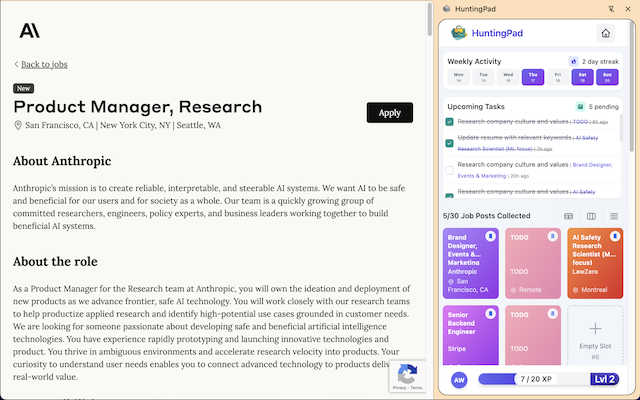
HuntingPad
Feature Comparison
Anyrow
AI-Powered Extraction
Anyrow's cutting-edge AI technology allows users to upload various document formats, including PDFs, images, and text. The AI efficiently extracts structured rows that match the defined schema, eliminating the need for manual templates and rules. This feature ensures that data is accurately captured from any document layout, making the extraction process seamless and highly reliable.
Live Editable Tables
Once the data is extracted, it flows directly into real-time editable tables. Users can easily filter, sort, and edit the extracted information, collaborating with team members in a single interface. This feature enhances productivity by allowing teams to manipulate and review data instantly, ensuring that everyone has access to the most up-to-date information.
Flexible Export Options
Anyrow offers versatile export options to meet diverse business needs. Users can export their extracted data in various formats, including CSV, Excel, JSON, and through API integrations or webhooks. This flexibility ensures that the data can be easily integrated into existing workflows or systems, enhancing operational efficiency.
Batch Upload Capability
With Anyrow, users can batch upload hundreds of documents at once, significantly speeding up the data extraction process. This feature is particularly beneficial for businesses dealing with high volumes of documents, allowing them to convert chaos into structured data in a matter of minutes rather than days.
HuntingPad
One-Click Job Capture
Effortlessly save any job posting from any website directly into your organized HuntingPad dashboard with a single click. This instant capture happens without leaving your browser, eliminating the tab explosion and manual copy-pasting that turns a search session into a disorganized mess. All critical details—company, role, link, and date—are automatically recorded, so you never lose track of an opportunity.
AI-Powered Resume Matching & Customization
Go beyond generic applications. HuntingPad's AI analyzes saved job descriptions and compares them to your uploaded resume. It then provides intelligent suggestions for keyword optimization and content tweaks to better align your resume with each specific role. This targeted customization helps your application pass through automated tracking systems and stand out to human recruiters.
Automatic Application Tracking & Smart Reminders
HuntingPad automatically logs when you apply for a saved job, creating a clear, searchable history of every submission. It integrates smart reminders for critical follow-up actions and interview dates, ensuring you never miss a deadline or lose momentum. This feature replaces the unreliable memory and outdated spreadsheets with a proactive, always-updated tracking system.
Local Data Storage for Maximum Privacy
Your job search data is sensitive. HuntingPad prioritizes your privacy by storing all your information—saved jobs, resumes, application history—locally on your own computer. Nothing is stored on external servers, giving you complete control and peace of mind that your career information remains secure and confidential throughout your search.
Use Cases
Anyrow
Streamlining Invoice Processing
Anyrow is ideal for accounting firms that need to process a high volume of invoices quickly and accurately. By extracting key fields like vendor name, invoice number, and amounts, Anyrow reduces manual data entry errors and accelerates financial workflows.
Enhancing Logistics Management
Logistics dispatchers can utilize Anyrow to manage shipping documents, contracts, and receipts efficiently. The ability to transform various documents into structured tables allows for better tracking and management of logistics operations.
Simplifying Financial Reporting
Finance teams can leverage Anyrow to extract and organize data from financial statements and reports. With the ability to query and edit extracted data, teams can generate insights faster, aiding in more informed decision-making.
Improving Data Accuracy for Bookkeepers
Bookkeepers can use Anyrow to automate data entry from multiple sources, ensuring that records are accurate and up-to-date. This reduces the burden of manual reconciliation and allows bookkeepers to focus on value-added tasks.
HuntingPad
The High-Volume Applicant
For professionals who need to send 100+ applications in a competitive market, HuntingPad is indispensable. It automates the tedious tracking and organization, allowing the user to focus on quality and volume simultaneously. The one-click save and auto-tracking prevent details from getting lost in the shuffle, making it possible to manage a large-scale campaign without chaos.
The Career Transitioner
Someone switching industries or roles often applies to diverse positions requiring different resume versions. HuntingPad helps organize these variations and uses AI to match the most relevant resume to each job. It keeps the search for multiple potential paths orderly, ensuring tailored applications for every opportunity without confusion.
The Passive Job Seeker
Even while employed, you might explore opportunities. HuntingPad allows for discreet, organized browsing. You can save interesting posts as you encounter them during your day without committing immediate time. Later, you can review, customize, and apply in a focused session, keeping your search efficient and under the radar.
The Networked Professional
For those who combine direct applications with referrals and conversations, tracking becomes complex. HuntingPad serves as a central log for all opportunities, whether from a job board, a LinkedIn message, or a coffee chat. You can note connections and next steps alongside each saved job, ensuring no lead falls through the cracks.
Overview
About Anyrow
Anyrow is an innovative AI-powered document extraction software designed to streamline the tedious task of data entry from various types of documents. It allows users to effortlessly upload PDFs, scanned images, invoices, receipts, emails, and more, transforming them into structured, editable tables. The core value proposition of Anyrow lies in its ability to provide schema-driven AI extraction without the need for per-vendor templates, making it a versatile solution for businesses across different sectors. Targeted primarily at operations teams, bookkeepers, accounting firms, logistics dispatchers, and finance teams, Anyrow simplifies the process of data extraction, storage, and management. By integrating extraction tools with CRUD functionalities and API capabilities, Anyrow replaces the cumbersome stack of tools like Parseur, Airtable, and Zapier, all within a single platform. This not only saves time but also reduces the complexity of managing multiple applications, allowing teams to focus on insights and decision-making instead of manual data handling.
About HuntingPad
HuntingPad is the essential Chrome extension for the modern, ambitious job seeker. It transforms the chaotic, overwhelming process of a high-volume job search into a structured, efficient, and strategic operation. Designed to work seamlessly right where you search—in your browser—it eliminates the need for cumbersome spreadsheets, scattered bookmarks, and constant app-switching. The tool is built for accomplished professionals who find that their proven methods of organization are buckling under the scale of today's competitive market, where sending 100-150 applications is often necessary to secure one offer. HuntingPad's core value proposition is simple: give you back your time and mental clarity. It captures job posts with a single click, provides AI-powered insights for stronger applications, and automatically tracks every detail, turning administrative overhead into a competitive advantage. With a steadfast commitment to privacy, all your data is stored locally on your device. For developers, managers, and any professional determined to land their next role without the burnout, HuntingPad is the command center that makes your job search work for you.
Frequently Asked Questions
Anyrow FAQ
What types of documents can I upload to Anyrow?
Anyrow supports a wide range of document types, including PDFs, scanned images, invoices, receipts, emails, Word documents, Excel files, and more. This versatility makes it easy to extract data from various sources.
How does the AI extraction process work?
The AI extraction process involves defining your schema once, after which Anyrow's technology automatically maps the content of each document to structured rows. This means no need for individual templates, allowing for efficient data extraction from any layout.
Can I collaborate with my team using Anyrow?
Yes, Anyrow features live editable tables that allow team members to collaborate in real-time. Users can filter, sort, and edit extracted data together, enhancing teamwork and productivity.
Is there a free trial available for Anyrow?
Absolutely! Anyrow offers a free trial that allows users to extract up to 150 documents per month at no cost. This gives potential customers the opportunity to experience the product fully before committing to a paid plan.
HuntingPad FAQ
How does HuntingPad handle my privacy?
HuntingPad is built with privacy as a core principle. All your data—saved jobs, resume information, and application history—is stored locally on your Chrome browser's storage on your device. We do not send or store your personal job search data on any external servers. Your information stays with you.
Is HuntingPad free to use?
Yes, you can start using HuntingPad for free. The extension offers core functionality to organize your job search at no cost. You can install it and begin saving and tracking jobs immediately without providing a credit card. Check the official Chrome Web Store page for details on any premium features.
Does it work on sites other than LinkedIn?
Absolutely. HuntingPad is designed as a universal tool for your job hunt. While it works perfectly on LinkedIn Jobs, you can also use the one-click capture feature on any other job board or company career page like Indeed, Glassdoor, AngelList, or a direct corporate site.
Can I use HuntingPad on multiple computers?
Your HuntingPad data is stored locally on the specific browser and device where you installed it. To use it on multiple computers, you would need to install the extension on each one. For syncing data across devices, you would need to rely on Chrome's own sync functionality for extensions, which may have limitations.
Alternatives
Anyrow Alternatives
Anyrow is an advanced AI document extraction software designed to transform various document types—such as PDFs, scans, and emails—into structured, editable tables. By integrating built-in storage and an API, Anyrow streamlines the process of data extraction, enabling users to efficiently manage their information in a single platform. This tool is especially beneficial for operational teams, accountants, and logistics professionals seeking to eliminate the inefficiencies of using multiple applications for data handling. Users often seek alternatives to Anyrow for various reasons, including pricing concerns, specific feature requirements, or compatibility with existing platforms. When considering an alternative, it's crucial to evaluate factors such as ease of integration, the flexibility of data extraction, user interface, and overall value for the intended use case. A well-rounded alternative should offer similar capabilities for document processing while aligning better with user needs and budget constraints.
HuntingPad Alternatives
HuntingPad is a specialized productivity tool designed to streamline the modern job search. As a Chrome extension, it focuses on capturing job postings, matching resumes with AI, and tracking applications directly within the browser, offering a centralized and private workflow for ambitious professionals. Users may explore alternatives for various reasons, such as needing a solution that works across multiple browsers or operating systems, requiring different pricing models, or seeking a specific feature set like deeper integration with other career platforms. The landscape of job search tools is diverse, catering to different preferences and workflows. When evaluating alternatives, key considerations include the core functionality for capturing and organizing opportunities, the sophistication of resume analysis and matching, the platform's approach to data privacy, and the overall user experience. The best choice aligns with your specific job search strategy and technical environment.