
Geekflare Connect vs Trafficclaw
Side-by-side comparison to help you choose the right AI tool.

Geekflare Connect
Geekflare Connect unifies your AI tools to slash costs and boost team collaboration.
Last updated: March 1, 2026

Trafficclaw
TrafficClaw is an AI analyst that answers questions and delivers growth insights from your live SEO and analytics data.
Last updated: April 13, 2026
Visual Comparison
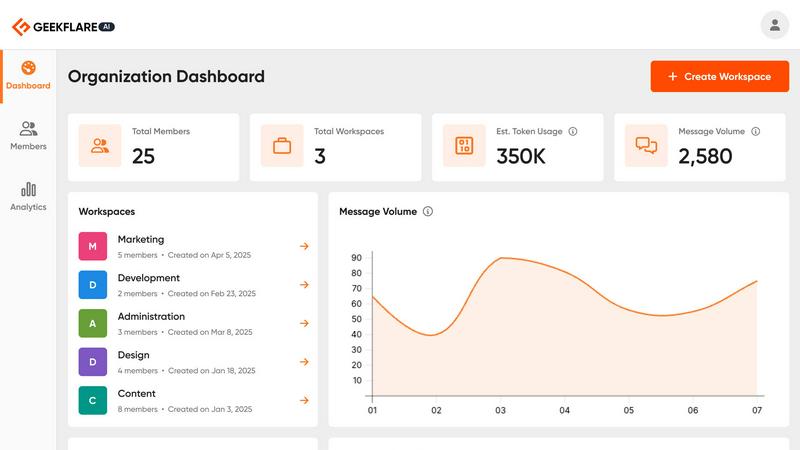
Geekflare Connect
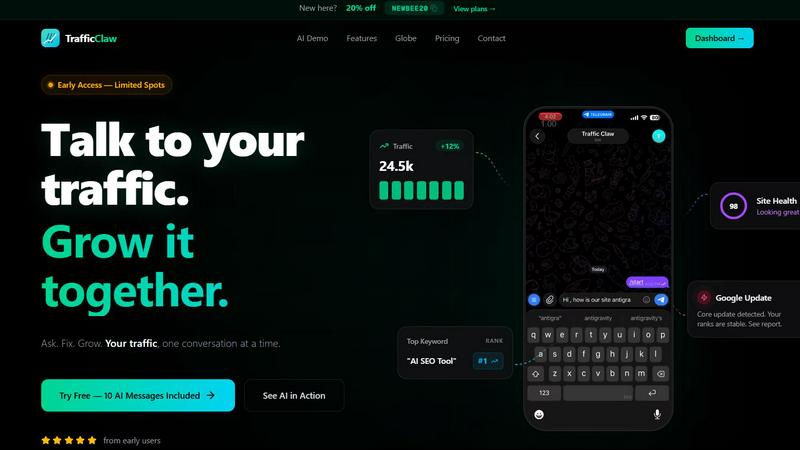
Trafficclaw
Feature Comparison
Geekflare Connect
Unified Multi-Model Workspace
Geekflare Connect provides a single, clean interface where teams can interact with multiple leading AI models from providers like OpenAI, Anthropic, and Google. This eliminates the need to juggle separate tabs, accounts, and interfaces, creating a cohesive environment for all AI-driven work. You can seamlessly switch between models within the same conversation, maintaining context and boosting productivity.
Multi-Model Comparison
This powerful feature allows you to submit a single prompt and instantly receive and compare responses from top-tier models like GPT-5.2, Claude 4.5, and Gemini 3 side-by-side. This direct comparison enables you to objectively evaluate tone, depth, creativity, and accuracy, ensuring you select the best possible output for any given task without manual, time-consuming testing.
Collaborative Projects & Sharing
Organize chats and workflows into dedicated project-based workspaces. Teams can securely share conversations, prompts, and context with relevant members, ensuring alignment and continuity. This feature centralizes knowledge, prevents redundant work, and allows managers to oversee AI usage effectively across different initiatives and departments.
Usage & Cost Analytics Dashboard
Gain full financial clarity with a consolidated dashboard that tracks token usage and estimates costs across all connected AI providers. This transparency empowers teams to monitor spending, identify high-cost areas, optimize model selection for cost-efficiency, and ultimately control and reduce their overall AI budget by making data-driven decisions.
Trafficclaw
AI Analyst Chat
This is the core of TrafficClaw. Engage in natural language conversation with an AI trained on your live analytics and SEO data. Ask specific questions about traffic trends, user behavior, or performance drops. The AI doesn't offer blog-style advice; it analyzes your connected data sources and delivers precise verdicts with evidence, often accompanied by charts and direct insights for immediate action.
SEO Intelligence Suite
Go beyond basic rankings. This feature proactively monitors your SEO health with advanced capabilities. It detects keyword gaps you can target, alerts you to content decay on older pages, identifies cannibalization issues where your pages compete against each other, and provides tools optimized for AI search engines. It turns raw search data into a strategic growth roadmap.
Integrated Analytics Dashboard
TrafficClaw unifies critical metrics into a single, intelligently designed overview. View real-time visitor counts, traffic trends, bounce rates, and conversion funnels side-by-side with your SEO data. This eliminates the need to constantly jump between GA4, Search Console, and other platforms, providing a holistic view of your site's performance in one glance.
Live Visitor Globe & Embed
A unique visual feature that displays your real-time GA4 traffic on an interactive 3D globe. See where your current visitors are located globally, with a live activity feed showing page views and exits. You can also generate an embed code to showcase this live globe on your own website, adding dynamic social proof without any additional tracking scripts.
Use Cases
Geekflare Connect
Content Creation & Strategy
Marketing and content teams can use the multi-model comparison to generate and refine copy, brainstorm ideas, and develop strategies. By instantly seeing outputs from different AI models, writers can choose the most suitable tone, combine the best elements, and produce higher-quality briefs, articles, and campaign ideas much faster.
Technical Development & Code Review
Developers and SREs can leverage different AI strengths for coding assistance, debugging, and system design. One model might excel at code generation while another provides superior explanations or security reviews. The unified workspace allows for efficient switching and comparison to solve complex technical problems and review code contextually.
Cross-Departmental Research & Analysis
Strategy, product, and business intelligence teams can utilize the Live Web Access feature to gather real-time data. They can then analyze this information across multiple AI models within a shared project workspace, synthesizing diverse insights to build comprehensive reports, competitive analyses, and data-driven recommendations collaboratively.
Enterprise AI Governance & Cost Control
IT and finance leaders can implement Geekflare Connect as a governed layer over AI spending. By providing teams with a single platform, they can track organization-wide usage, manage access, promote best practices through a shared prompt library, and directly control costs without stifling innovation or access to cutting-edge models.
Trafficclaw
Diagnosing Sudden Traffic Drops
When your analytics show an unexplained traffic decline, instead of manually cross-referencing data for hours, simply ask the AI Analyst "Why did my traffic drop?" It will analyze your connected GA4 and Search Console data, pinpointing causes such as a Google algorithm update impact, a specific page losing rankings, or a technical issue, and provide the evidence-backed reason.
Uncovering Content & Keyword Opportunities
Identify growth levers without manual research. Ask questions like "What are my top untapped keyword opportunities?" or "Which old blog posts need updating?" The AI sifts through your search performance data to highlight content gaps, pages suffering from decay, and high-potential keywords you're not yet ranking for, directing your content efforts effectively.
Real-Time Website Performance Monitoring
Keep a pulse on your site's immediate activity and health. Use the unified dashboard to watch real-time visitor flow, geographic distribution, and on-site behavior concurrently with core SEO metrics. This is invaluable for monitoring campaign launches, site changes, or immediate reactions to industry news.
Streamlining Client or Stakeholder Reporting
For agencies or teams, TrafficClaw simplifies communication. The clear, conversational insights and visual dashboard provide an easily digestible snapshot of performance. You can quickly generate answers to specific stakeholder questions or use the live embed globe to transparently showcase site activity and engagement directly to clients.
Overview
About Geekflare Connect
Geekflare Connect is the definitive BYOK (Bring Your Own Key) AI platform engineered for modern, cost-conscious teams. It solves the critical problem of vendor lock-in and fragmented AI spending by unifying access to the world's leading large language models—including OpenAI's GPT series, Google's Gemini, Anthropic's Claude, and several others—within a single, professional interface. This platform is designed for businesses and professionals across departments like marketing, development, product, and strategy who require the right tool for each specific task without managing multiple subscriptions and logins. Its core value proposition is twofold: significant cost optimization, with reported savings of up to 65% on AI expenditures, and enhanced team collaboration. By providing a centralized workspace for prompt sharing, project organization, and unified usage analytics, Geekflare Connect transforms AI from a collection of disparate tools into a streamlined, strategic asset that fosters agility, improves output quality through direct model comparison, and gives leaders full visibility and control over their AI investment.
About Trafficclaw
TrafficClaw is an AI-powered analytics command center designed to cut through the noise of traditional data tools. It transforms the complex, often frustrating task of understanding website performance into a simple conversation. By connecting directly to your Google Analytics 4 and Google Search Console accounts, TrafficClaw provides an AI analyst with real-time access to your data. Instead of staring at static graphs and exporting spreadsheets, you can ask direct questions like "Why did my traffic drop last Tuesday?" or "What are my top keyword opportunities?" and receive specific, actionable verdicts backed by your own metrics. It's built for website owners, marketers, and developers who value their time and seek direct, intelligent insights over generic advice. The core promise is effortless growth: stop switching between tabs, start having a dialogue with your data, and get clear fixes to drive your traffic forward.
Frequently Asked Questions
Geekflare Connect FAQ
What is a BYOK (Bring Your Own Key) AI platform?
BYOK means you provide your own API keys from AI providers like OpenAI or Anthropic. Geekflare Connect does not sell AI model access; instead, it acts as a superior interface and management layer on top of your existing subscriptions. You retain full control and billing directly with your providers, while Connect helps you use those credits more efficiently and collaboratively.
How does Geekflare Connect help reduce AI costs by up to 65%?
Cost reduction is achieved through several mechanisms: the ability to choose cheaper, task-appropriate models instead of defaulting to a single expensive one; usage analytics that identify and curb wasteful spending; features like shared workspaces and a prompt library that reduce redundant queries; and overall better management of your allocated API credits across your entire team.
Is my data and conversation history private and secure?
Yes. As a BYOK platform, your API keys and interactions are handled with security in mind. Your conversation history and uploaded documents for your "Private AI Brain" are stored securely within your workspace. The platform is designed for professional use, ensuring that your proprietary data and prompts remain within your controlled, collaborative environment.
Can I use Geekflare Connect with my entire team?
Absolutely. Geekflare Connect is built for team collaboration. You can invite team members, organize them into projects, and manage permissions. Features like shared chat histories, collaborative workspaces, and team-wide usage analytics are specifically designed to enhance teamwork, maintain consistency, and provide oversight for managers and team leads.
Trafficclaw FAQ
How does TrafficClaw access my data?
TrafficClaw uses secure, read-only Google OAuth to connect to your Google Analytics 4 and Search Console accounts. This means we never see your password, and our access is limited to viewing your analytics data only. Your data remains in your Google account and is not sold or used for training public AI models.
What makes the AI advice different from generic tips?
The AI Analyst is fundamentally different because it operates on your live, first-party data. Instead of giving general best practices, it analyzes your specific traffic patterns, keyword rankings, and user behavior to deliver personalized verdicts. The insight "your traffic dropped because page X lost its #3 ranking for keyword Y" is actionable, whereas "create better content" is not.
Is there a setup or coding required?
Setup takes less than a minute and requires no coding. You simply sign in with Google, grant read-only permissions to your GA4 and Search Console properties, and TrafficClaw auto-detects and imports your data. Your dashboard and AI Analyst are ready to use immediately after.
Can I use the Live Globe on my website?
Yes. The Live Visitor Globe is a feature available to all users. You can generate a unique embed code from your TrafficClaw dashboard and insert it as a simple iframe into any webpage, CMS like WordPress, or custom-coded site. It will then display real-time visitor data from your connected GA4 property without requiring any additional tracking code on your site.
Alternatives
Geekflare Connect Alternatives
Geekflare Connect is a BYOK (Bring Your Own Key) AI management platform in the productivity and management category. It centralizes access to leading AI models, enabling teams to collaborate, compare outputs, and control costs from a single interface. Users may explore alternatives for various reasons, including specific budget constraints, the need for different feature sets, or integration requirements with their existing tech stack. Some teams might seek platforms with a stronger focus on particular workflows or more granular access controls. When evaluating other solutions, consider core capabilities like multi-model support, real-time data access, and collaborative tools. The ideal platform should align with your team's size, technical expertise, and primary use cases while offering transparent pricing and robust security for managing AI resources.
Trafficclaw Alternatives
Trafficclaw is an AI assistant for SEO and analytics, designed to translate complex data into actionable insights. It connects to platforms like Google Analytics and Search Console, allowing users to ask direct questions about their traffic and performance to receive clear, data-backed answers. Users explore alternatives for various reasons, such as budget constraints, the need for different feature sets, or integration with a broader tech stack. Some may require more advanced reporting, team collaboration tools, or support for additional data sources beyond the core offerings. When evaluating other solutions, prioritize tools that offer genuine conversational analysis, not just dashboards. Look for robust, secure data connections, transparent pricing, and a focus on delivering specific, corrective insights rather than just surfacing problems.