
audiovideogenerator vs SeeDance Ai
Side-by-side comparison to help you choose the right AI tool.

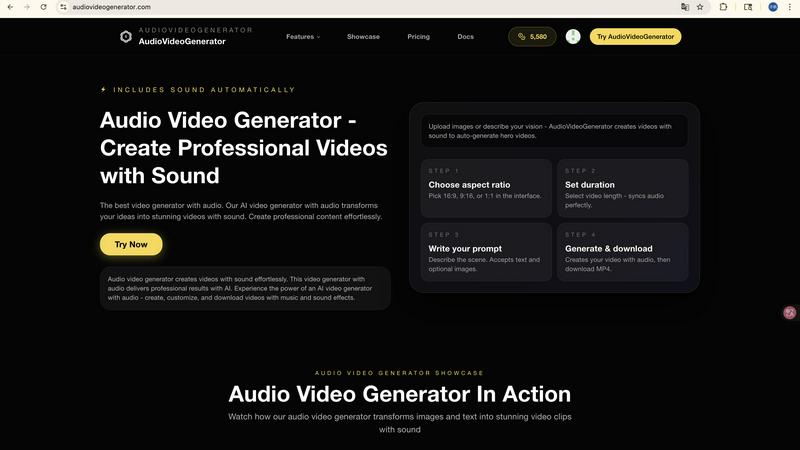
Audiovideogenerator creates professional AI videos with synchronized sound effortlessly.

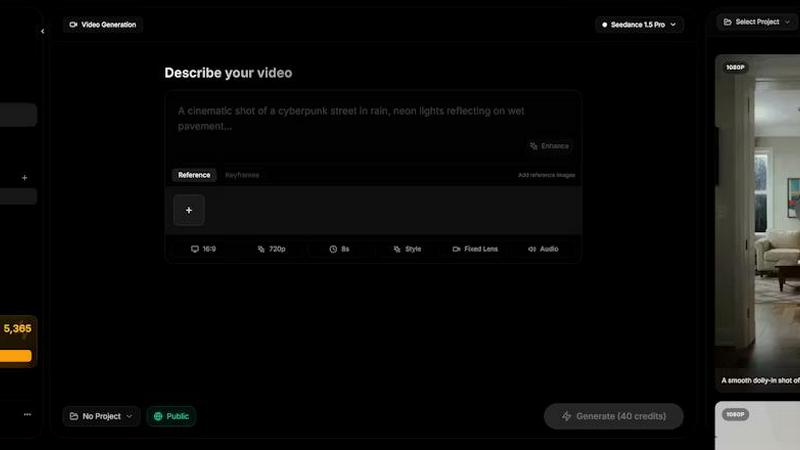
Seedance AI transforms your text, images, audio, and video into polished, sound-synced cinematic clips in one seamless generation.
Last updated: April 13, 2026
Visual Comparison
audiovideogenerator
SeeDance Ai
Feature Comparison
audiovideogenerator
Multi-Model AI Video Generation
AudioVideoGenerator provides access to a curated selection of the world's most advanced AI video models, including OpenAI's Sora 2, Google's Veo 3.1, and Wan 2.5. This allows users to select the ideal engine for their specific need, whether it's generating longer, high-fidelity narratives (3-8 minutes with Veo 3.1) or creating quick, cinematic clips (1-3 minutes with Veo 3.1 Fast). Each model is seamlessly integrated, ensuring you get the best possible visual quality tailored to your project's scope and style.
Automatic Audio Synchronization
This is the platform's signature capability. The AI doesn't just add random sound; it analyzes the generated video's content, mood, and pacing to automatically score it with perfectly matched background music, sound effects, and ambient audio. This creates a cohesive sensory experience where the audio dynamically complements the visual narrative, delivering professional sound design that would typically require expert knowledge and hours of manual work.
Text, Image, and Audio Input Flexibility
The platform supports multiple creative starting points. Use the Text-to-Video feature to generate scenes from descriptive prompts alone. Transform static photos into dynamic sequences with Image-to-Video. Uniquely, the A2V (Audio-to-Video) model allows you to input an audio file, and the AI generates a video that visually interprets and synchronizes with the provided sound, ideal for music videos or audio-driven storytelling.
Scenario-Optimized Templates & Outputs
AudioVideoGenerator is designed for real-world application. It offers optimized settings and aspect ratios for specific platforms like Instagram, TikTok, and YouTube. The system understands the requirements for different content types, whether it's a fast-paced social media clip, a detailed product demonstration, or an emotional brand story, ensuring the final video is not only professionally produced but also format-ready for its intended use case.
SeeDance Ai
Multimodal @ Reference System
This core feature revolutionizes creative control. Instead of relying solely on descriptive text, you can upload up to 12 reference files—including images, videos, and audio clips—and tag them directly in your prompt using the @ symbol. This allows for precise instruction, such as applying a specific face from an image, replicating a camera move from a video, or syncing to the beat of an audio track, effectively eliminating guesswork and enabling exact creative replication.
Native Audio-Visual Synchronization
SeeDance Ai generates audio and video together in a single model pass, not as separate, post-processed layers. This results in exact timing where sound effects land on the correct frame, footsteps match the beat, and lip-sync remains accurate. The model natively produces environmental audio, background music, and character dialogue, making high-quality sound an integral part of the initial generation rather than a manual afterthought.
Consistent Character & Identity Lock
The platform solves the pervasive issue of character drift through a cross-attention reference system. It locks in facial geometry, clothing details, and stylistic elements across different scenes and shots. This ensures that characters, logos, and product details remain sharp, recognizable, and consistent throughout a video sequence, which is essential for serialized content, branded campaigns, and professional storytelling.
Precise Camera & Motion Control
Creators can achieve specific cinematic movements by uploading a reference video. The AI analyzes and replicates exact camera behaviors such as dolly zooms, tracking shots, orbital movements, or handheld shakes. This extends to complex human motion, allowing for the faithful transfer of choreography, dance routines, or martial arts sequences from a reference clip to newly generated characters with high physical fidelity.
Use Cases
audiovideogenerator
Social Media Content Creation
Create engaging, platform-optimized videos for Instagram Reels, TikTok, and YouTube Shorts. The generator produces content with perfect aspect ratios and automatically adds trending, attention-grabbing audio tracks and effects. This enables creators and brands to maintain a consistent, high-quality posting schedule without the overhead of video and audio production, keeping audiences engaged with professional-looking content.
Marketing & Promotional Campaigns
Generate compelling promotional videos, product showcases, and advertisement clips. The AI seamlessly incorporates background music and sound effects that enhance the product's appeal and the campaign's emotional tone. This allows marketers to produce a variety of A/B testable ad assets, explainer videos, and launch content quickly and cost-effectively, delivering cinema-quality visuals with professional audio.
Educational Tutorials & Online Courses
Transform static learning materials, slides, or concepts into engaging educational videos. The platform adds relevant, non-distracting background music and sound effects that can highlight key points, making tutorials, online course modules, and presentations more dynamic and easier to follow. This enhances knowledge retention and production value for educators and trainers.
Brand Storytelling & Event Highlights
Craft narrative-driven brand stories and emotional event recap videos. By inputting key themes or selecting relevant imagery, the AI generates a visual sequence scored with music that matches the desired sentiment—from inspirational and uplifting to reflective. This helps businesses build deeper emotional connections with their audience and preserve the energy of live events through professionally produced highlight reels.
SeeDance Ai
Marketing & Promotional Clips
Brands and agencies can rapidly produce high-fidelity promotional videos, product showcases, and ad creatives. The ability to maintain consistent product visuals and brand characters across multiple shots, combined with native, synced audio, creates polished marketing assets without the need for expensive studio shoots or complex post-production editing.
Social Media & Viral Content Creation
Content creators and influencers can generate engaging, trend-focused videos for platforms like TikTok, Instagram Reels, and YouTube Shorts. The tool excels at creating dance videos, dynamic sketches, and visually compelling narratives with smooth motion and perfect audio sync, tailored for high engagement and shareability in fast-paced social feeds.
Cinematic Storytelling & Short Films
Independent filmmakers and storytellers can use the platform as a pre-visualization tool or to produce complete short films. The automatic multi-shot sequencing, director-level control over camera angles and motion, and consistent characters enable the creation of coherent, multi-scene narratives with a cinematic feel, all from a detailed prompt and reference materials.
Educational & Explainer Videos
Educators and businesses can create clear, engaging explainer videos and training content. By using image references for diagrams and audio for narration, the platform can generate videos where complex concepts are visualized with smooth animations and perfectly timed voiceovers or sound effects, enhancing comprehension and retention.
Overview
About audiovideogenerator
AudioVideoGenerator is the definitive AI-powered platform for creating professional-grade videos with fully integrated, synchronized audio. It transcends basic video generation by intelligently pairing your visuals with complementary background music, sound effects, and ambient audio, eliminating the complex, multi-step process of manual audio editing. The platform is engineered for a diverse audience, including content creators, marketers, educators, and businesses, who seek to produce engaging content without requiring a production team or specialized skills. Its core value proposition lies in its seamless automation of the most technically demanding aspect of video production—audio synchronization and scoring—while offering access to cutting-edge AI models like Sora 2, Veo 3.1, and Wan 2.5. Whether starting from text, an image, or an audio file, AudioVideoGenerator transforms your initial idea into a polished, cinematic output in minutes. It champions a quality-over-quantity approach, ensuring every generated piece is not just seen, but heard with professional clarity, thereby enhancing viewer engagement and storytelling impact effortlessly.
About SeeDance Ai
SeeDance Ai is a specialized, multimodal AI video generation platform engineered for creators who demand cinematic quality and director-level control. It transcends basic text-to-video conversion by accepting a powerful combination of inputs: text prompts, images, audio clips, and video references. This allows it to generate polished, multi-shot video sequences with native audio-visual synchronization, realistic motion, and high adherence to creative direction. The platform directly tackles common industry pain points like "anatomical drift" and character inconsistency by implementing advanced motion-transfer and cross-attention systems, ensuring skeletal integrity and stable character identity across shots. With models like SeeDance 2.0 and SeeDance 1.5 Pro, it is designed for professional workflows in marketing, social content creation, dance, and storytelling, functioning as an automated production pipeline that handles camera work, physics, and sound design simultaneously.
Frequently Asked Questions
audiovideogenerator FAQ
What types of audio does AudioVideoGenerator add to my videos?
The AI automatically generates and synchronizes a complete audio track comprising three key elements: contextually appropriate background music that matches the video's mood, realistic sound effects relevant to the on-screen action, and ambient audio beds to create atmosphere. This holistic approach ensures your video has professional, multi-layered sound design.
Which AI models can I use, and how do I choose?
AudioVideoGenerator integrates top models like Sora 2, Veo 3.1 (and Veo 3.1 Fast), and Wan 2.5. Your choice depends on your needs: use Veo 3.1 for the highest quality longer videos, Veo 3.1 Fast for quick social clips, Sora 2 for creative, detailed narratives, and Wan 2.5 for efficient image-to-video transformation. The interface provides guidance on each model's best use case.
Can I use my own images or audio files as a starting point?
Absolutely. The platform specializes in Image-to-Video transformation, allowing you to upload a static photo to animate. Furthermore, the unique Audio-to-Video (A2V) model lets you upload an audio file (e.g., a song, podcast, or voiceover), and the AI will generate a video visually interpreted from and synchronized to that audio.
Is the generated content ready for commercial use?
Yes, videos created with AudioVideoGenerator are designed for commercial use, suitable for advertising campaigns, social media content, product marketing, and more. The platform handles the audio licensing and generation, providing you with a complete, royalty-free asset. However, it is always recommended to review the final output to ensure it aligns with your brand guidelines.
SeeDance Ai FAQ
What makes SeeDance Ai different from other AI video generators?
SeeDance Ai distinguishes itself through its true multimodal generation and native audio-visual sync. While many tools generate silent video or add sound later, SeeDance produces both simultaneously for perfect timing. Its @ reference system provides unparalleled control by using images, video, and audio as direct inputs, and its advanced models are specifically engineered to solve problems like character inconsistency and unnatural physics.
What types of files can I use as references?
You can upload a combination of reference files to guide your generation, including up to 9 images, 3 videos, and 3 audio clips. These are tagged in your text prompt using the @ symbol (e.g., @Image1, @Video2), allowing the AI to use specific elements from each file as precise instructions for the final video output.
Can SeeDance Ai create videos with consistent characters?
Yes, maintaining consistent characters is a core capability. Using its cross-attention reference system, SeeDance Ai can lock in a character's facial features, hairstyle, clothing, and other identity markers across multiple shots and entirely different scenes. This makes it highly effective for projects that require the same character to appear repeatedly.
Is SeeDance Ai affiliated with ByteDance or TikTok?
No, it is important to note that seedanceai.com is an independent website and platform. It is not affiliated with, associated with, or endorsed by ByteDance Ltd. or any of its products, such as TikTok.