
Anyrow vs URL to Any
Side-by-side comparison to help you choose the right AI tool.

Anyrow transforms PDFs, scans, and emails into structured, editable tables, streamlining document data extraction and export.
Last updated: April 13, 2026

URL to Any
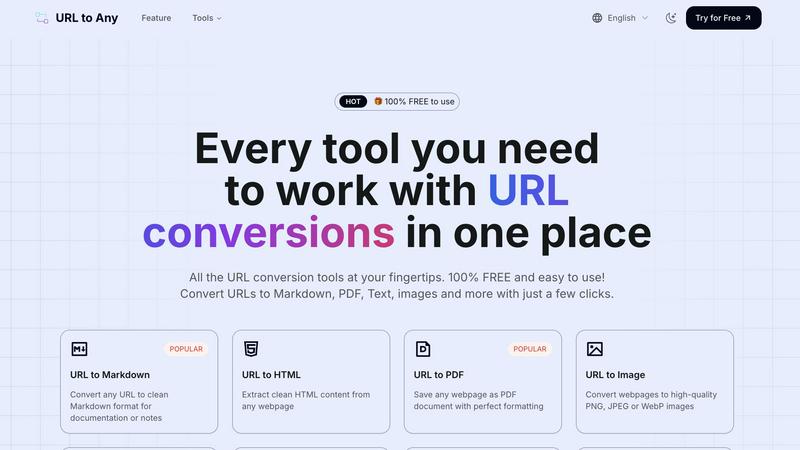
URL to Any instantly converts any webpage into Markdown, PDF, images, and more with a single click.
Last updated: March 1, 2026
Visual Comparison
Anyrow

URL to Any
Feature Comparison
Anyrow
AI-Powered Extraction
Anyrow's cutting-edge AI technology allows users to upload various document formats, including PDFs, images, and text. The AI efficiently extracts structured rows that match the defined schema, eliminating the need for manual templates and rules. This feature ensures that data is accurately captured from any document layout, making the extraction process seamless and highly reliable.
Live Editable Tables
Once the data is extracted, it flows directly into real-time editable tables. Users can easily filter, sort, and edit the extracted information, collaborating with team members in a single interface. This feature enhances productivity by allowing teams to manipulate and review data instantly, ensuring that everyone has access to the most up-to-date information.
Flexible Export Options
Anyrow offers versatile export options to meet diverse business needs. Users can export their extracted data in various formats, including CSV, Excel, JSON, and through API integrations or webhooks. This flexibility ensures that the data can be easily integrated into existing workflows or systems, enhancing operational efficiency.
Batch Upload Capability
With Anyrow, users can batch upload hundreds of documents at once, significantly speeding up the data extraction process. This feature is particularly beneficial for businesses dealing with high volumes of documents, allowing them to convert chaos into structured data in a matter of minutes rather than days.
URL to Any
Multi-Format Conversion Engine
At the heart of URL to Any is its robust conversion engine that supports over ten distinct output formats. With just a few clicks, users can transform a live webpage into a clean PDF for archiving, structured Markdown for documentation, an image snapshot for presentations, or pure text for easy copying. This versatility ensures that regardless of your specific need—whether for development, content creation, or personal reference—the tool provides a direct and efficient path from URL to usable content without compromising on formatting quality.
Advanced Content Extraction Tools
Beyond basic conversion, URL to Any offers specialized extraction tools for technical and analytical tasks. Users can pull clean HTML from a page's source, convert content into structured JSON or XML for data processing, or extract all meta tags and headings for SEO analysis. The platform also includes utilities for encoding/decoding text in multiple formats and extracting every URL from a site into a handy list. These features cater to developers, digital marketers, and analysts who require precise data from the web.
AI-Powered Summarization
Leveraging advanced AI technology, URL to Any includes an intelligent summarizer that can instantly condense lengthy webpage articles, reports, or blog posts into concise summaries. This feature is invaluable for researchers, students, and professionals who need to quickly grasp the core ideas of online content without reading through entire pages, dramatically accelerating the information-gathering and review process.
Instant QR Code & File Generation
The tool simplifies sharing and accessibility by allowing users to generate QR codes from any URL with a single click, perfect for marketing materials or presentations. Furthermore, its integrated processing can convert text-based web content into an MP3 audio file, effectively turning articles into podcasts for on-the-go listening. This combination of utility features makes information more portable and accessible across different mediums and use cases.
Use Cases
Anyrow
Streamlining Invoice Processing
Anyrow is ideal for accounting firms that need to process a high volume of invoices quickly and accurately. By extracting key fields like vendor name, invoice number, and amounts, Anyrow reduces manual data entry errors and accelerates financial workflows.
Enhancing Logistics Management
Logistics dispatchers can utilize Anyrow to manage shipping documents, contracts, and receipts efficiently. The ability to transform various documents into structured tables allows for better tracking and management of logistics operations.
Simplifying Financial Reporting
Finance teams can leverage Anyrow to extract and organize data from financial statements and reports. With the ability to query and edit extracted data, teams can generate insights faster, aiding in more informed decision-making.
Improving Data Accuracy for Bookkeepers
Bookkeepers can use Anyrow to automate data entry from multiple sources, ensuring that records are accurate and up-to-date. This reduces the burden of manual reconciliation and allows bookkeepers to focus on value-added tasks.
URL to Any
Content Creation and Documentation
Bloggers, writers, and technical documentarians can use URL to Any to quickly capture research, quotes, or references from web pages. Converting a source article into clean Markdown or text allows for easy integration into notes, drafts, or documentation systems without messy formatting issues, streamlining the research and writing pipeline while properly attributing sources.
Web Development and Design
Developers and designers frequently need to analyze website structure, extract specific code snippets, or capture design layouts. Converting a URL to HTML provides clean code for study, while generating an image of the page offers a perfect visual reference for mockups or client presentations, facilitating more efficient design replication and debugging.
Academic Research and Study
Students and academics can save online journals, articles, and resources as well-formatted PDFs for offline reading and annotation. The AI summarizer helps in quickly reviewing literature, and extracting pure text is ideal for highlighting key points or importing citations into research papers, making the tool a powerful ally for efficient study sessions.
Digital Marketing and SEO Analysis
SEO specialists and digital marketers can leverage the meta tag and heading extractors to audit competitors' websites and analyze on-page SEO elements. The ability to export this data to CSV allows for easy comparison and reporting. Additionally, creating QR codes from campaign landing pages is a quick way to bridge offline and online marketing efforts.
Overview
About Anyrow
Anyrow is an innovative AI-powered document extraction software designed to streamline the tedious task of data entry from various types of documents. It allows users to effortlessly upload PDFs, scanned images, invoices, receipts, emails, and more, transforming them into structured, editable tables. The core value proposition of Anyrow lies in its ability to provide schema-driven AI extraction without the need for per-vendor templates, making it a versatile solution for businesses across different sectors. Targeted primarily at operations teams, bookkeepers, accounting firms, logistics dispatchers, and finance teams, Anyrow simplifies the process of data extraction, storage, and management. By integrating extraction tools with CRUD functionalities and API capabilities, Anyrow replaces the cumbersome stack of tools like Parseur, Airtable, and Zapier, all within a single platform. This not only saves time but also reduces the complexity of managing multiple applications, allowing teams to focus on insights and decision-making instead of manual data handling.
About URL to Any
URL to Any is a comprehensive, free-to-use web content conversion platform designed to streamline the process of capturing and transforming online information. It serves as an essential toolkit for content creators, developers, researchers, and anyone who regularly works with web-based content. The core value proposition is its powerful simplicity: a single, accessible interface that instantly converts any webpage into a wide array of practical formats, including Markdown, PDF, HTML, images, and structured data like JSON and XML. By eliminating the need for complex software, manual copying, or user registration, URL to Any bridges the gap between dynamic online resources and the static formats required for editing, archiving, sharing, and analysis. It empowers users to save time, enhance productivity, and integrate web content seamlessly into their digital workflows, all while maintaining a strong commitment to user privacy with secure, cloud-based processing that does not store personal data.
Frequently Asked Questions
Anyrow FAQ
What types of documents can I upload to Anyrow?
Anyrow supports a wide range of document types, including PDFs, scanned images, invoices, receipts, emails, Word documents, Excel files, and more. This versatility makes it easy to extract data from various sources.
How does the AI extraction process work?
The AI extraction process involves defining your schema once, after which Anyrow's technology automatically maps the content of each document to structured rows. This means no need for individual templates, allowing for efficient data extraction from any layout.
Can I collaborate with my team using Anyrow?
Yes, Anyrow features live editable tables that allow team members to collaborate in real-time. Users can filter, sort, and edit extracted data together, enhancing teamwork and productivity.
Is there a free trial available for Anyrow?
Absolutely! Anyrow offers a free trial that allows users to extract up to 150 documents per month at no cost. This gives potential customers the opportunity to experience the product fully before committing to a paid plan.
URL to Any FAQ
Is URL to Any really free to use?
Yes, URL to Any is completely free to use. Every tool and feature on the platform is available at no cost, with no hidden fees, subscription plans, or required user registration. You can start converting URLs immediately without any limitations on usage.
How does URL to Any handle my privacy and data?
Your privacy is a top priority. URL to Any processes all conversions securely in the cloud. Crucially, the submitted URLs and the resulting converted content are not stored on their servers after the processing is complete. Your data remains private and is not used for any other purpose.
What formats can I convert a URL into?
URL to Any supports a wide range of formats to suit various needs. Popular options include Markdown, PDF, PNG/JPEG/WebP images, plain text, HTML, JSON, and XML. You can also generate QR codes, extract all links from a page, and even convert text content to MP3 audio files.
Do I need to install any software to use it?
No installation is required. URL to Any is a fully web-based platform that runs in your browser. However, for added convenience, a browser extension is available to allow for even quicker access to the conversion tools directly from your browser's toolbar while you browse.
Alternatives
Anyrow Alternatives
Anyrow is an advanced AI document extraction software designed to transform various document types—such as PDFs, scans, and emails—into structured, editable tables. By integrating built-in storage and an API, Anyrow streamlines the process of data extraction, enabling users to efficiently manage their information in a single platform. This tool is especially beneficial for operational teams, accountants, and logistics professionals seeking to eliminate the inefficiencies of using multiple applications for data handling. Users often seek alternatives to Anyrow for various reasons, including pricing concerns, specific feature requirements, or compatibility with existing platforms. When considering an alternative, it's crucial to evaluate factors such as ease of integration, the flexibility of data extraction, user interface, and overall value for the intended use case. A well-rounded alternative should offer similar capabilities for document processing while aligning better with user needs and budget constraints.
URL to Any Alternatives
URL to Any is a streamlined web content conversion tool, part of the broader AI Assistants category. It allows users to effortlessly transform any webpage into formats like Markdown, PDF, or images directly from a URL, all without registration or cost. Users often seek alternatives for various reasons. Some may require advanced features like batch processing or API access, while others might need integration with specific platforms or workflows. Pricing models, such as subscription tiers for higher usage limits, can also drive the search for different solutions. When evaluating other tools, consider your core needs. Key factors include the range of supported output formats, processing speed, data privacy policies, and whether the tool operates as a one-time purchase, a freemium service, or a completely free utility like URL to Any. The ideal choice balances functionality with simplicity for your specific use case.