
AI Formatter vs Never Drop
Side-by-side comparison to help you choose the right AI tool.
AI Formatter
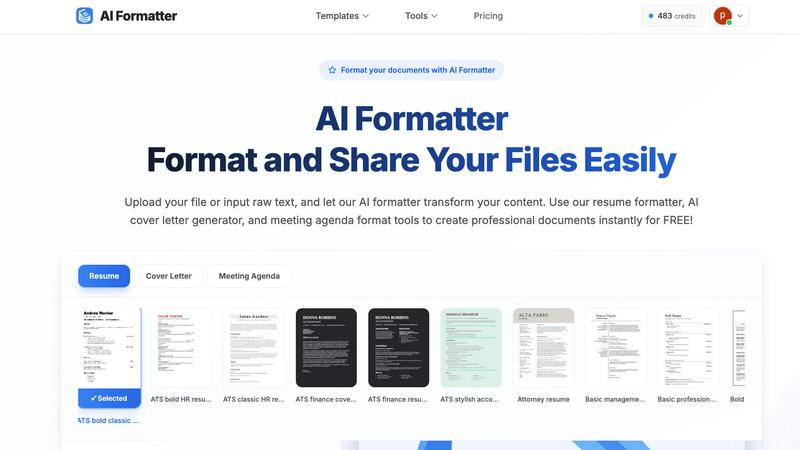
AI Formatter transforms raw text into polished documents using 1000+ professional templates, all for free.
Last updated: March 1, 2026

Never Drop
NeverDrop captures contacts and drafts personalized follow-ups instantly, ensuring you never lose a lead at events.
Last updated: February 28, 2026
Visual Comparison
AI Formatter
Never Drop

Feature Comparison
AI Formatter
One-Click Formatting
With just one click, users can upload a document or input raw text, allowing the AI formatter to instantly transform content into a polished format. This feature supports multiple file formats, including PDF, DOC, DOCX, and TXT, up to a maximum size of 10MB, enhancing user convenience.
ATS-Optimized Templates
AI Formatter provides an extensive library of over 162 professional templates specifically designed to pass ATS screenings. Users can choose from a variety of resume formats, cover letter designs, and meeting agenda layouts that are not only visually appealing but also functionally effective.
Real-Time Editing
After the AI processes a document, users can review and make adjustments using an intuitive editor. This feature enables customization of content while maintaining the professional look, allowing users to ensure that their documents are tailored to their specific needs.
Multi-Format Download Options
Once the document has been formatted and edited, users can download their creations in a variety of formats, including Word and PDF. This flexibility ensures that users can easily share or submit their documents according to their requirements.
Never Drop
Instant Business Card Scanning
Never Drop allows users to scan any business card in seconds. Leveraging AI-powered Optical Character Recognition (OCR), the app extracts all essential contact details, including name, company, title, phone number, and email. This feature eliminates the hassle of manual entry, ensuring that users can capture leads without any tedious typing.
Automated Email Enrichment
The app automatically enriches contacts by finding verified work emails associated with the name and company on the business card. This feature is vital, as it eliminates the guesswork often involved in identifying the right email addresses, allowing sales teams to connect with leads more effectively.
AI-Driven Follow-Up Emails
Never Drop generates personalized follow-up emails based on the context and voice notes recorded during the lead capture process. This feature ensures that follow-ups are not generic but tailored to the specific conversation, enhancing the chances of a positive response and engagement from leads.
Team Collaboration Dashboard
Never Drop provides a comprehensive dashboard that allows sales teams to organize scans by event, reassign leads among team members, and track overall activity. This centralization ensures that all team members remain aligned, and no lead falls through the cracks, fostering collaboration and efficiency.
Use Cases
AI Formatter
Job Seekers
Individuals looking for new employment opportunities can leverage AI Formatter to create ATS-compatible resumes and compelling cover letters that stand out in competitive job markets. By utilizing the platform, they can greatly enhance their chances of getting noticed by recruiters.
Business Professionals
Companies aiming to standardize their documentation can use AI Formatter to create professional meeting agendas and invoices. This ensures uniformity across all their professional materials, helping to maintain a consistent brand image.
Students and Graduates
Recent graduates or students entering the job market can utilize AI Formatter to craft polished resumes and cover letters that effectively showcase their skills and experiences, making them more appealing to potential employers.
Freelancers
Freelancers can benefit from AI Formatter by producing polished invoices and proposals that reflect professionalism. This not only enhances their credibility but also helps in securing more clients through well-formatted documentation.
Never Drop
Trade Shows and Expos
At trade shows, time is of the essence. Never Drop allows sales teams to quickly scan business cards, capture conversation context, and send follow-ups before moving on to the next potential client. This immediate response increases the likelihood of conversion significantly.
Networking Events
During networking events, professionals often meet numerous contacts in a short period. Never Drop helps users efficiently gather and manage leads, ensuring that vital information is recorded and follow-ups are executed promptly, making it easier to maintain connections.
Conferences and Seminars
Conferences often present opportunities to engage with industry leaders and potential clients. With Never Drop, users can seamlessly capture leads and contextualize their conversations, ensuring impactful follow-ups that resonate with attendees.
Business Meetings and Dinners
In more intimate settings like business dinners, capturing leads can be challenging. Never Drop simplifies this process by allowing users to scan business cards and add personal notes quickly, ensuring that follow-ups reflect the nuances of each conversation, thereby fostering stronger relationships.
Overview
About AI Formatter
AI Formatter is a cutting-edge, cloud-based document intelligence platform meticulously crafted to streamline the often arduous process of document formatting. Designed to cater to a diverse audience, it transforms raw, unstructured text and various uploaded files into polished, professional documents in mere seconds. The core strength of AI Formatter lies in its advanced AI engine, which not only enhances the aesthetic appeal of documents but also intelligently structures content for optimal effectiveness, especially for Applicant Tracking Systems (ATS). With a proven ATS pass rate exceeding 95%, job seekers gain a significant edge in their career pursuits. Whether you are an individual navigating a career transition or a business striving for standardized professional documentation, AI Formatter is your go-to solution. It boasts over 100 industry-specific templates for resumes, cover letters, meeting agendas, and invoices, ensuring every user can achieve a consistent and high-quality standard in their documentation. The platform seamlessly combines automation with user control through a real-time editing feature, making the creation of professional-grade documents both accessible and efficient.
About Never Drop
Never Drop is an innovative lead-capture application tailored for sales teams navigating the fast-paced environment of trade shows, conferences, and networking events. This app simplifies the often cumbersome process of collecting and managing leads by enabling users to effortlessly scan business cards using their smartphones. Upon scanning, users can enrich the captured data with valuable context, such as voice notes or text detailing their conversations. This ensures that users retain crucial information about each lead, enhancing follow-up effectiveness. Utilizing advanced AI technology, Never Drop drafts personalized follow-up emails in under two minutes, significantly reducing the chances of losing leads. Seamless integration with popular CRMs like HubSpot allows for a streamlined sales pipeline, ensuring that leads are organized and actionable. With Never Drop, sales teams can transform every interaction into a potential closed deal.
Frequently Asked Questions
AI Formatter FAQ
How does AI Formatter ensure ATS compatibility?
AI Formatter utilizes templates that are specifically designed to meet ATS requirements, ensuring that the formatting and structure of documents are optimized for automated screening systems.
What file formats does AI Formatter support?
AI Formatter supports a variety of file formats, including PDF, DOC, DOCX, and TXT, allowing users to upload existing documents or input raw text directly into the system.
Can I customize my documents after formatting?
Yes, AI Formatter includes a real-time editing feature that allows users to customize and edit their documents after the AI formatting process, ensuring that the final product meets their specific needs.
Is there a cost associated with using AI Formatter?
AI Formatter offers its services for free, allowing users to create professional documents without any financial commitment. However, please check the website for any updates or changes regarding pricing.
Never Drop FAQ
What is Never Drop?
Never Drop is a lead-capture app designed for sales teams at events. It enables users to scan business cards, add contextual notes, and generate personalized follow-up emails in under two minutes, all while enriching contact details and syncing with CRMs.
How does business card scanning work?
Users take a photo of any business card using the Never Drop mobile app. The app’s AI-powered OCR technology extracts key contact information such as name, company, title, phone number, and email, allowing for quick and efficient lead capture.
What types of events is Never Drop suitable for?
Never Drop is ideal for trade shows, conferences, networking events, meetups, and business dinners. It is designed to help users manage and follow up on leads efficiently across various professional settings.
Do I need the mobile app for full functionality?
Yes, the mobile app is essential for scanning business cards, recording context, and triggering follow-ups on the go. Additionally, the web dashboard facilitates team management, review of scans, and billing, providing a comprehensive solution for lead management.
Alternatives
AI Formatter Alternatives
AI Formatter is a cloud-based document intelligence platform that specializes in transforming raw text into professionally formatted documents using an advanced AI engine. This tool falls under the category of productivity and management, streamlining the document creation process for both individuals and businesses. Users often seek alternatives to AI Formatter for various reasons, including pricing, specific feature sets, or compatibility with different platforms. When searching for alternatives, it is essential to consider factors such as template variety, user-friendliness, and the ability to maintain document structure and formatting integrity. Ultimately, the ideal alternative should provide a seamless user experience and a robust set of features that align with individual needs, ensuring that users can create high-quality documents efficiently. It’s also crucial to assess the extent of customization options and the support for various document types, especially for those who require industry-specific templates or enhanced compatibility with tools like Applicant Tracking Systems.
Never Drop Alternatives
Never Drop is a cutting-edge lead-capture app designed for sales teams in dynamic environments like trade shows and networking events. By allowing users to effortlessly scan business cards and enrich the captured data with personalized notes, it enhances the lead management process. As a productivity and management tool, it aims to streamline follow-ups, turning interactions into meaningful connections. Users often seek alternatives to Never Drop for various reasons, including pricing considerations, feature sets, or specific platform compatibility. When evaluating alternatives, it's essential to consider the ease of use, the ability to integrate with existing tools, and the overall effectiveness in enhancing lead management and follow-up processes. A suitable alternative should align with the unique needs of your sales strategy while ensuring that no valuable leads are overlooked.