
AI Formatter vs Anyrow
Side-by-side comparison to help you choose the right AI tool.

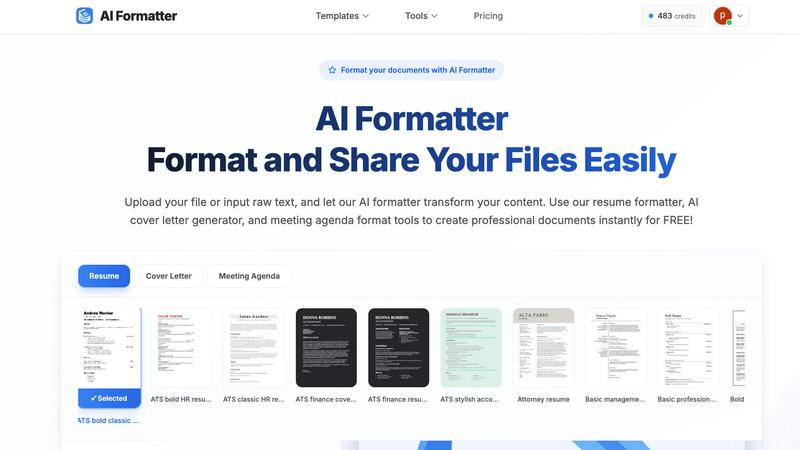
AI Formatter transforms raw text into polished documents using 1000+ professional templates, all for free.
Last updated: March 1, 2026

Anyrow transforms PDFs, scans, and emails into structured, editable tables, streamlining document data extraction and export.
Last updated: April 13, 2026
Visual Comparison
AI Formatter
Anyrow

Feature Comparison
AI Formatter
One-Click Formatting
With just one click, users can upload a document or input raw text, allowing the AI formatter to instantly transform content into a polished format. This feature supports multiple file formats, including PDF, DOC, DOCX, and TXT, up to a maximum size of 10MB, enhancing user convenience.
ATS-Optimized Templates
AI Formatter provides an extensive library of over 162 professional templates specifically designed to pass ATS screenings. Users can choose from a variety of resume formats, cover letter designs, and meeting agenda layouts that are not only visually appealing but also functionally effective.
Real-Time Editing
After the AI processes a document, users can review and make adjustments using an intuitive editor. This feature enables customization of content while maintaining the professional look, allowing users to ensure that their documents are tailored to their specific needs.
Multi-Format Download Options
Once the document has been formatted and edited, users can download their creations in a variety of formats, including Word and PDF. This flexibility ensures that users can easily share or submit their documents according to their requirements.
Anyrow
AI-Powered Extraction
Anyrow's cutting-edge AI technology allows users to upload various document formats, including PDFs, images, and text. The AI efficiently extracts structured rows that match the defined schema, eliminating the need for manual templates and rules. This feature ensures that data is accurately captured from any document layout, making the extraction process seamless and highly reliable.
Live Editable Tables
Once the data is extracted, it flows directly into real-time editable tables. Users can easily filter, sort, and edit the extracted information, collaborating with team members in a single interface. This feature enhances productivity by allowing teams to manipulate and review data instantly, ensuring that everyone has access to the most up-to-date information.
Flexible Export Options
Anyrow offers versatile export options to meet diverse business needs. Users can export their extracted data in various formats, including CSV, Excel, JSON, and through API integrations or webhooks. This flexibility ensures that the data can be easily integrated into existing workflows or systems, enhancing operational efficiency.
Batch Upload Capability
With Anyrow, users can batch upload hundreds of documents at once, significantly speeding up the data extraction process. This feature is particularly beneficial for businesses dealing with high volumes of documents, allowing them to convert chaos into structured data in a matter of minutes rather than days.
Use Cases
AI Formatter
Job Seekers
Individuals looking for new employment opportunities can leverage AI Formatter to create ATS-compatible resumes and compelling cover letters that stand out in competitive job markets. By utilizing the platform, they can greatly enhance their chances of getting noticed by recruiters.
Business Professionals
Companies aiming to standardize their documentation can use AI Formatter to create professional meeting agendas and invoices. This ensures uniformity across all their professional materials, helping to maintain a consistent brand image.
Students and Graduates
Recent graduates or students entering the job market can utilize AI Formatter to craft polished resumes and cover letters that effectively showcase their skills and experiences, making them more appealing to potential employers.
Freelancers
Freelancers can benefit from AI Formatter by producing polished invoices and proposals that reflect professionalism. This not only enhances their credibility but also helps in securing more clients through well-formatted documentation.
Anyrow
Streamlining Invoice Processing
Anyrow is ideal for accounting firms that need to process a high volume of invoices quickly and accurately. By extracting key fields like vendor name, invoice number, and amounts, Anyrow reduces manual data entry errors and accelerates financial workflows.
Enhancing Logistics Management
Logistics dispatchers can utilize Anyrow to manage shipping documents, contracts, and receipts efficiently. The ability to transform various documents into structured tables allows for better tracking and management of logistics operations.
Simplifying Financial Reporting
Finance teams can leverage Anyrow to extract and organize data from financial statements and reports. With the ability to query and edit extracted data, teams can generate insights faster, aiding in more informed decision-making.
Improving Data Accuracy for Bookkeepers
Bookkeepers can use Anyrow to automate data entry from multiple sources, ensuring that records are accurate and up-to-date. This reduces the burden of manual reconciliation and allows bookkeepers to focus on value-added tasks.
Overview
About AI Formatter
AI Formatter is a cutting-edge, cloud-based document intelligence platform meticulously crafted to streamline the often arduous process of document formatting. Designed to cater to a diverse audience, it transforms raw, unstructured text and various uploaded files into polished, professional documents in mere seconds. The core strength of AI Formatter lies in its advanced AI engine, which not only enhances the aesthetic appeal of documents but also intelligently structures content for optimal effectiveness, especially for Applicant Tracking Systems (ATS). With a proven ATS pass rate exceeding 95%, job seekers gain a significant edge in their career pursuits. Whether you are an individual navigating a career transition or a business striving for standardized professional documentation, AI Formatter is your go-to solution. It boasts over 100 industry-specific templates for resumes, cover letters, meeting agendas, and invoices, ensuring every user can achieve a consistent and high-quality standard in their documentation. The platform seamlessly combines automation with user control through a real-time editing feature, making the creation of professional-grade documents both accessible and efficient.
About Anyrow
Anyrow is an innovative AI-powered document extraction software designed to streamline the tedious task of data entry from various types of documents. It allows users to effortlessly upload PDFs, scanned images, invoices, receipts, emails, and more, transforming them into structured, editable tables. The core value proposition of Anyrow lies in its ability to provide schema-driven AI extraction without the need for per-vendor templates, making it a versatile solution for businesses across different sectors. Targeted primarily at operations teams, bookkeepers, accounting firms, logistics dispatchers, and finance teams, Anyrow simplifies the process of data extraction, storage, and management. By integrating extraction tools with CRUD functionalities and API capabilities, Anyrow replaces the cumbersome stack of tools like Parseur, Airtable, and Zapier, all within a single platform. This not only saves time but also reduces the complexity of managing multiple applications, allowing teams to focus on insights and decision-making instead of manual data handling.
Frequently Asked Questions
AI Formatter FAQ
How does AI Formatter ensure ATS compatibility?
AI Formatter utilizes templates that are specifically designed to meet ATS requirements, ensuring that the formatting and structure of documents are optimized for automated screening systems.
What file formats does AI Formatter support?
AI Formatter supports a variety of file formats, including PDF, DOC, DOCX, and TXT, allowing users to upload existing documents or input raw text directly into the system.
Can I customize my documents after formatting?
Yes, AI Formatter includes a real-time editing feature that allows users to customize and edit their documents after the AI formatting process, ensuring that the final product meets their specific needs.
Is there a cost associated with using AI Formatter?
AI Formatter offers its services for free, allowing users to create professional documents without any financial commitment. However, please check the website for any updates or changes regarding pricing.
Anyrow FAQ
What types of documents can I upload to Anyrow?
Anyrow supports a wide range of document types, including PDFs, scanned images, invoices, receipts, emails, Word documents, Excel files, and more. This versatility makes it easy to extract data from various sources.
How does the AI extraction process work?
The AI extraction process involves defining your schema once, after which Anyrow's technology automatically maps the content of each document to structured rows. This means no need for individual templates, allowing for efficient data extraction from any layout.
Can I collaborate with my team using Anyrow?
Yes, Anyrow features live editable tables that allow team members to collaborate in real-time. Users can filter, sort, and edit extracted data together, enhancing teamwork and productivity.
Is there a free trial available for Anyrow?
Absolutely! Anyrow offers a free trial that allows users to extract up to 150 documents per month at no cost. This gives potential customers the opportunity to experience the product fully before committing to a paid plan.
Alternatives
AI Formatter Alternatives
AI Formatter is a cloud-based document intelligence platform that specializes in transforming raw text into professionally formatted documents using an advanced AI engine. This tool falls under the category of productivity and management, streamlining the document creation process for both individuals and businesses. Users often seek alternatives to AI Formatter for various reasons, including pricing, specific feature sets, or compatibility with different platforms. When searching for alternatives, it is essential to consider factors such as template variety, user-friendliness, and the ability to maintain document structure and formatting integrity. Ultimately, the ideal alternative should provide a seamless user experience and a robust set of features that align with individual needs, ensuring that users can create high-quality documents efficiently. It’s also crucial to assess the extent of customization options and the support for various document types, especially for those who require industry-specific templates or enhanced compatibility with tools like Applicant Tracking Systems.
Anyrow Alternatives
Anyrow is an advanced AI document extraction software designed to transform various document types—such as PDFs, scans, and emails—into structured, editable tables. By integrating built-in storage and an API, Anyrow streamlines the process of data extraction, enabling users to efficiently manage their information in a single platform. This tool is especially beneficial for operational teams, accountants, and logistics professionals seeking to eliminate the inefficiencies of using multiple applications for data handling. Users often seek alternatives to Anyrow for various reasons, including pricing concerns, specific feature requirements, or compatibility with existing platforms. When considering an alternative, it's crucial to evaluate factors such as ease of integration, the flexibility of data extraction, user interface, and overall value for the intended use case. A well-rounded alternative should offer similar capabilities for document processing while aligning better with user needs and budget constraints.