
Phishly
Phishly uses AI to instantly detect phishing emails with a simple one-click scan in your browser or Gmail.
Visit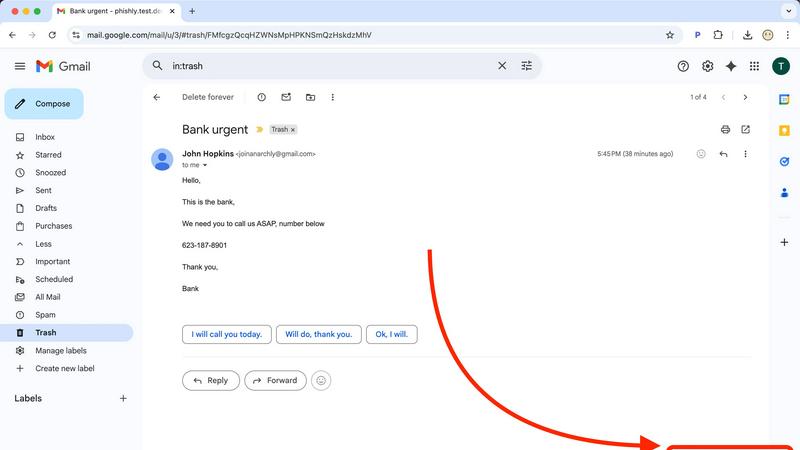
About Phishly
Phishly is an innovative AI-powered phishing detection platform designed to enhance email security for both individuals and small businesses. Available as a convenient Chrome extension for Gmail and an accessible web tool, Phishly simplifies the process of identifying potentially harmful emails. Users can effortlessly scan their emails by clicking "Scan with Phishly" in Gmail or by pasting suspicious messages directly onto the Phishly website for immediate analysis. The platform employs advanced artificial intelligence to detect a wide range of phishing indicators, including suspicious domain names, urgent or alarming language, spoofed sender addresses, and various social engineering tactics. Phishly categorizes the risk level of each email as Safe, Medium Risk, or High Risk, accompanied by detailed explanations to help users understand the threats they may face. This user-friendly tool is perfect for anyone seeking straightforward phishing protection without the complexities often associated with enterprise-level solutions. Importantly, Phishly only analyzes the emails that users explicitly choose to scan, ensuring that privacy is maintained throughout the process. With no technical knowledge required and the service offered for free, users receive instant answers to their concerns about email legitimacy and security.
Features of Phishly
Intelligent Email Scanning
Phishly's intelligent email scanning feature allows users to analyze any email for potential phishing threats effortlessly. By simply clicking "Scan with Phishly" in Gmail or pasting email content on the website, users receive immediate feedback on possible risks.
Comprehensive Risk Assessment
Each scanned email is evaluated and categorized into three risk levels: Safe, Medium Risk, and High Risk. This comprehensive risk assessment provides users with clear insights into the legitimacy of their emails, empowering them to make informed decisions.
Detailed Threat Explanations
Phishly goes beyond just presenting risk levels by offering detailed explanations of the phishing indicators detected within an email. This educational aspect helps users understand the specific signs of phishing and enhances their overall email security awareness.
Privacy-Focused Analysis
Phishly prioritizes user privacy by only analyzing emails that users explicitly choose to scan. This means that users can trust that their personal information and email content remain secure and confidential while using the platform.
Use Cases of Phishly
Individual Email Protection
Individuals can utilize Phishly to protect their personal email accounts from phishing attacks. By scanning suspicious emails, users can quickly determine if they are dealing with a legitimate sender or a potential scam, enhancing their online safety.
Small Business Security
Small businesses can implement Phishly as a cost-effective solution to safeguard their communications. With its easy-to-use interface and clear risk assessments, Phishly helps small teams remain vigilant against phishing attempts without requiring extensive training.
Email Verification for Online Transactions
Phishly is particularly useful for users engaging in online transactions. By scanning emails related to purchases, confirmations, or sensitive information, users can verify the legitimacy of the communications they receive, ensuring safe online interactions.
Education and Awareness Building
Educators and trainers can leverage Phishly as a tool for teaching about email security and phishing threats. By using real examples from their inboxes, participants can learn to recognize phishing attempts and adopt safer email practices.
Frequently Asked Questions
How does Phishly detect phishing emails?
Phishly utilizes advanced AI algorithms to analyze emails for various phishing indicators such as suspicious domains, urgent language, and spoofed sender addresses. This allows the platform to accurately assess the risk level of each email.
Is Phishly free to use?
Yes, Phishly is completely free to use. Users can scan emails and receive risk assessments without any costs or subscriptions, making it accessible to everyone.
Do I need technical knowledge to use Phishly?
No, Phishly is designed to be user-friendly and requires no technical expertise. Users can easily scan their emails and understand the risk assessments provided by the platform.
Is my privacy protected when using Phishly?
Absolutely. Phishly only analyzes the emails that users explicitly choose to scan, ensuring that personal information and email content remain private and secure throughout the process.
Explore more in this category:
Similar to Phishly

Panzoe
Panzoe is an all-in-one AI platform for personal productivity, business automation, AI assistants, content creation, and custom AI solutions.
Novastart
Novastart brings apps and files onto an infinite canvas where people and AI agents can work together.
AUTOMATER.ai
A tray helper for every AI coding tool: sessions, alerts and usage in one place
Kody Tools
Free collection of online developer utilities, code formatters, and digital converters designed to streamline your daily workflow.
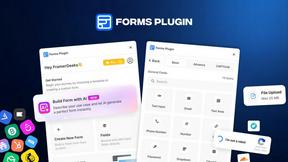
Forms Plugin
The #1 Native Form Builder Plugin for Framer - No Code, No Embeds, No External Platforms.

HomeAnswerBook
Practical, independent guides to home repairs, maintenance, costs, troubleshooting, and everyday fixes.
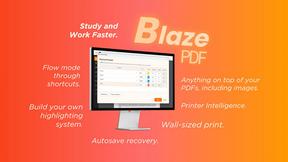
BlazePDF
Highlight faster. Study in flow with custom shortcuts and a workflow built around you. Print smarter, or turn any page into a tiled poster.
