
DocuExtractor
Effortlessly convert receipts and invoices into structured CSV or Excel files, eliminating manual data entry.
Visit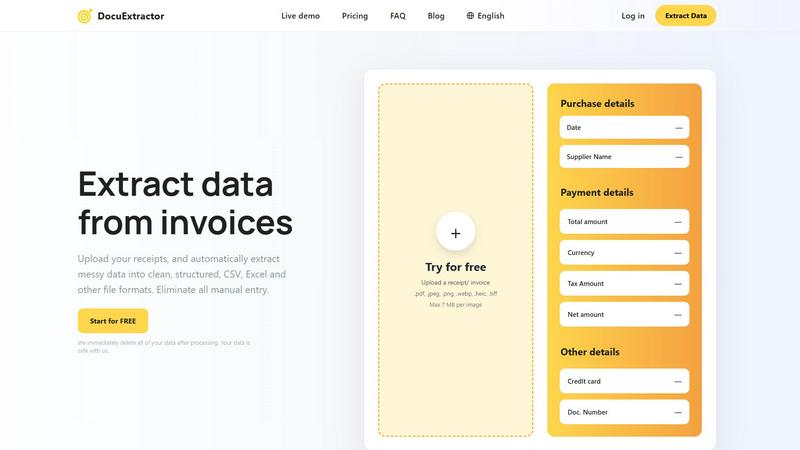
About DocuExtractor
DocuExtractor is an advanced document conversion software that revolutionizes how businesses handle data extraction from financial documents. Designed specifically for accountants and bookkeepers, DocuExtractor utilizes state-of-the-art Optical Character Recognition (OCR) technology to transform unstructured data, such as invoices, receipts, and bank statements, into clean, organized formats like CSV and Excel. This powerful tool is tailored to eliminate the tedious manual data entry that often plagues financial professionals, saving them valuable time and enhancing overall productivity. With its capability to process documents in over 45 languages and handle batch uploads, DocuExtractor is an ideal solution for businesses of all sizes. Whether you are an independent contractor or part of a large corporation, DocuExtractor provides a reliable and efficient means to manage financial data effectively.
Features of DocuExtractor
Advanced Optical Character Recognition
DocuExtractor employs cutting-edge OCR technology that ensures high accuracy in data extraction. This feature allows users to convert messy, handwritten, or printed text into structured data with remarkable precision, minimizing errors and ensuring reliable results.
Batch Processing Capability
With the ability to upload multiple documents at once, DocuExtractor significantly enhances workflow efficiency. Users can drag and drop several files for simultaneous processing, making it ideal for businesses with high volumes of financial documents.
Instant Data Extraction
DocuExtractor's automated extraction process is designed to deliver results in seconds. Users can quickly obtain structured data without waiting, allowing for faster decision-making and improved operational efficiency.
Multilingual Support
Supporting over 45 languages, DocuExtractor is equipped with automatic language detection, enabling users from diverse backgrounds to process documents seamlessly. This feature broadens accessibility and usability for international businesses.
Use Cases of DocuExtractor
Streamlining Accounting Processes
Accountants can leverage DocuExtractor to automate the extraction of data from invoices and receipts, significantly reducing the time spent on manual entry. This not only accelerates the accounting process but also minimizes the potential for human error.
Enhanced Financial Reporting
Businesses can utilize DocuExtractor to collect and analyze financial data from various sources, such as bank statements. The software allows for quick aggregation of data, facilitating more timely and accurate financial reporting.
Efficient Expense Management
Companies can streamline their expense management processes by using DocuExtractor to extract data from receipts and invoices. This helps in maintaining accurate records while simplifying the reimbursement process for employees.
Simplified Tax Preparation
During tax season, DocuExtractor can assist tax professionals by quickly extracting data from financial documents. This ensures that all necessary information is readily available, reducing the burden of data collection and improving compliance.
Frequently Asked Questions
How does DocuExtractor ensure data security?
DocuExtractor prioritizes user data security by immediately deleting all uploaded documents after processing. This commitment ensures that sensitive financial information remains confidential and secure.
Can I use DocuExtractor for documents in different languages?
Yes, DocuExtractor supports over 45 languages with automatic language detection, making it a versatile tool for international users and businesses dealing with multilingual documents.
What types of documents can be processed with DocuExtractor?
DocuExtractor can handle a wide range of financial documents, including invoices, receipts, bank statements, and various image formats such as PDF, JPG, and PNG, among others.
Is there customer support available for users?
Absolutely. DocuExtractor offers expert customer support to assist users with any issues or questions they may have, ensuring that help is readily available to maintain a smooth workflow.
Explore more in this category:
Similar to DocuExtractor

Panzoe
Panzoe is an all-in-one AI platform for personal productivity, business automation, AI assistants, content creation, and custom AI solutions.
Novastart
Novastart brings apps and files onto an infinite canvas where people and AI agents can work together.

AUTOMATER.ai
A tray helper for every AI coding tool: sessions, alerts and usage in one place

Kody Tools
Free collection of online developer utilities, code formatters, and digital converters designed to streamline your daily workflow.
Forms Plugin
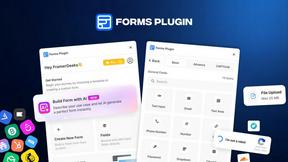
The #1 Native Form Builder Plugin for Framer - No Code, No Embeds, No External Platforms.


HomeAnswerBook
Practical, independent guides to home repairs, maintenance, costs, troubleshooting, and everyday fixes.
BlazePDF
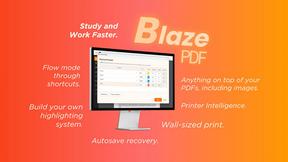
Highlight faster. Study in flow with custom shortcuts and a workflow built around you. Print smarter, or turn any page into a tiled poster.