
ButterKit
ButterKit is a polished Mac app that streamlines creating stunning, translated App Store screenshots and metadata to reach more users.
Visit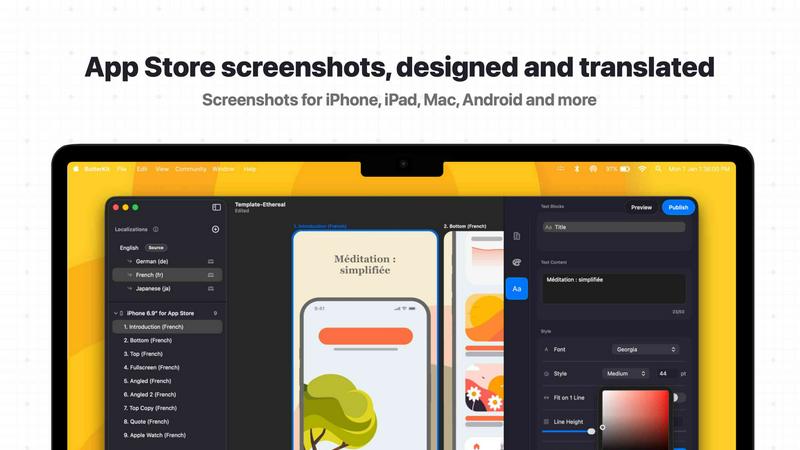
About ButterKit
ButterKit is a native macOS application engineered specifically for Apple developers who are tired of the tedious, repetitive tasks involved in publishing apps to the App Store. This tool is purpose-built to streamline the entire workflow, from capturing screenshots to localizing metadata and uploading the final assets. At its core, ButterKit solves the fundamental challenge of creating polished, localized App Store product pages that convert visitors into users. The application allows developers to capture screenshots directly from the Xcode Simulator or drag and drop existing images onto photorealistic 3D device frames. These frames are not mere overlays; they are real, high-resolution 3D models rendered using Apple's Metal framework, providing a level of visual fidelity that sets your screenshots apart. Beyond the visual polish, ButterKit tackles the massive hurdle of localization. Using advanced AI models, it can instantly translate your app's metadata and on-screen text into all 50 App Store Connect languages, ensuring your app is accessible to a global audience without the manual overhead. The tool integrates deeply with the App Store Connect API, enabling one-click uploads of your finalized screenshots and metadata. For developers embedded in modern CI/CD pipelines, ButterKit is a natural fit. It can link entire folders for input and output, working seamlessly with automation tools like Fastlane. Created by a solo developer who understands the pain points of the publishing process, ButterKit is a focused, high-quality solution designed to make the journey from code to published app as smooth and efficient as possible, saving developers hours of manual design and localization work.
Features of ButterKit
Capture Tool for Xcode Simulator
ButterKit eliminates the need for manual screenshot management by integrating directly with Xcode and its Simulator. Instead of using web tools or taking screenshots manually, you can capture app screenshots directly from the Simulator with a single click. This feature allows for rapid iteration, letting you quickly test different designs, states, and localizations without leaving your workflow. The captured images are instantly placed onto your chosen 3D device frame, ready for further editing or export.
Real 3D Device Rendering
ButterKit is not a simple image overlay tool; it is a powerful 3D rendering engine. It uses high-resolution, photorealistic 3D models of Apple devices that you can rotate, scale, and position to achieve the perfect look for your screenshots. Built on Apple's Metal framework, all edits are fluid and responsive, running at up to 120 frames per second. This allows you to create the polished, selling screenshots that stand out on the App Store.
Instant AI-Powered Translation
Localizing your app for a global audience is no longer a manual chore. ButterKit leverages advanced AI models to translate your app's metadata, including descriptions, keywords, and promotional text, into all 50 App Store Connect languages in seconds. Your designs remain perfectly synced across all languages, ensuring a consistent and professional look for users worldwide, without the need to manage dozens of separate design files.
Seamless App Store Connect Integration
ButterKit connects directly to the App Store Connect API, turning your finished work into a live submission with one click. You can batch export all your images and metadata, or upload them directly to the correct slots in App Store Connect, in the correct order. This integration eliminates the manual process of dragging and dropping dozens of files into a web browser, reducing the risk of errors and saving significant time.
Use Cases of ButterKit
Solo Indie Developer Workflow
For a solo developer managing a single app, time is the most precious resource. ButterKit automates the most time-consuming parts of the App Store publishing process. You can capture screenshots directly from the Simulator, apply a professional template, translate all metadata into multiple languages, and upload everything to App Store Connect in a fraction of the time it would take to do manually. This lets you focus on building your app instead of wrestling with store listings.
Design Studio and Agency Production
Design studios and agencies that manage multiple client apps need a consistent, high-quality output. ButterKit provides a standardized workflow for creating stunning screenshots. Designers can use the pro editing tools to create custom templates and panoramic backgrounds, ensuring every client's App Store page has a cohesive and premium look. The ability to link folders for batch processing makes it easy to handle large volumes of assets for multiple projects simultaneously.
CI/CD and Fastlane Automation
Teams that have invested in continuous integration and continuous deployment pipelines need tools that fit into their automated workflows. ButterKit is designed for this. By linking entire folders for input and output, it integrates naturally with Fastlane and other automation tools. You can have your CI system generate screenshots via Xcode UI tests, pass them to ButterKit for framing and localization, and then automatically upload the finished assets to App Store Connect, creating a fully automated publishing pipeline.
App Localization and Global Expansion
When an app is ready to expand into new international markets, the localization process can be a bottleneck. ButterKit removes this obstacle by translating all app metadata into 50 languages instantly. This allows a development team to prepare a global launch in a single session. The synced designs mean that as you update your primary language screenshots, the localized versions are updated automatically, ensuring that your global marketing efforts remain consistent and up-to-date.
Frequently Asked Questions
Can I use my own images with ButterKit?
Yes, ButterKit supports dragging and dropping PNG or JPG screenshot images directly onto the 3D device frames. You are not limited to captures from the Xcode Simulator. You can also link an entire folder of pre-generated images, making it compatible with assets created by other tools or design software.
Does ButterKit integrate with Fastlane?
Yes, ButterKit is designed to work seamlessly with Fastlane and other CI/CD pipelines. You can link a folder of images as the input source, and specify a folder for the output. This allows you to automate the entire process of capturing, framing, and exporting screenshots as part of your automated build and deployment workflow.
How does the translation feature work?
ButterKit uses advanced AI models to translate your app's metadata, such as the app description, keywords, and promotional text, into all 50 App Store Connect languages. The translation is performed within the app, and your designs are kept in sync across all languages. This ensures that any changes you make to your primary language are reflected in all localized versions.
Is ButterKit a subscription or a one-time purchase?
ButterKit is a one-time purchase for the macOS application. There are no recurring subscription fees to use the core features of the app. Additional templates and add-ons are available through a community marketplace, but the core functionality for capturing, designing, translating, and uploading is included in the initial purchase.
Similar to ButterKit

laya.tools
Free directory of 950+ projects built on Laya, the open-source model that turns text into typed decisions. Ports, SDKs, agents and demos.
Forms Plugin
The #1 Native Form Builder Plugin for Framer - No Code, No Embeds, No External Platforms.


JsonTranslate
A json translater for translating JSON, Markdown, and TXT files while preserving keys, nested paths, and project structure.

AkraLabs
Where modern software products get discovered, launched, and distributed. Explore verified AI tools, SaaS startups, and developer software.

NeutrixFlow
AI tools directory with practical reviews, comparisons, and guides.