
Browsilla
Browsilla transforms your Chrome new tab into a clean, focused dashboard for tasks, bookmarks, weather, and inspiration.
Visit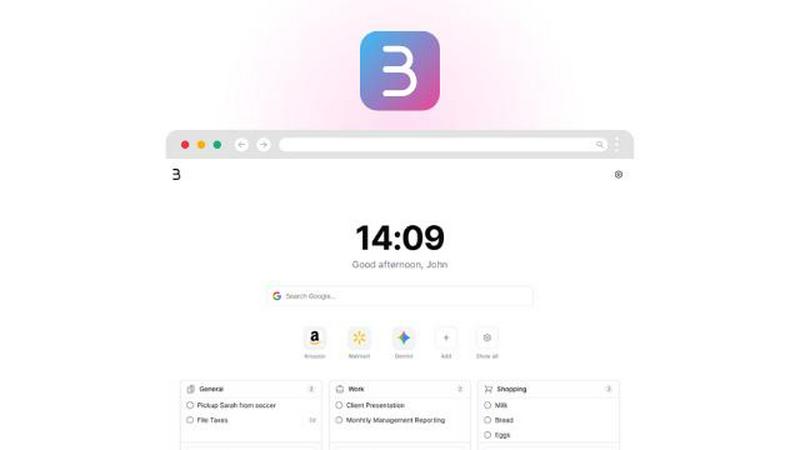
About Browsilla
Browsilla is an innovative Chrome extension designed to enhance your browsing experience by transforming every new tab into a focused productivity workspace. It replaces the common distractions found in default new tabs, such as news feeds and advertisements, with essential tools that matter most to you. Users can access their tasks, quick links, bookmarks, local weather updates, and a clean search bar, all in one minimalist interface. Browsilla caters specifically to makers, founders, and professionals who value simplicity and efficiency in their daily tasks. With no account required, it prioritizes user privacy and ensures that everything runs locally within your browser. This means no tracking or unnecessary complications, allowing you to maintain focus and productivity right from the moment you open a new tab.
Features of Browsilla
Task Manager Built-In
Browsilla includes a built-in task manager that allows you to add and organize your tasks directly within your new tab. You can create folders for different projects, ensuring that all your to-dos are easily accessible and manageable. This feature helps you stay on top of your responsibilities without the need to switch between multiple applications.
Quick Bookmarks
With Browsilla's quick bookmarks feature, you can pin your most-used websites directly onto your new tab. This eliminates the hassle of digging through bookmark folders and provides instant access to the sites you visit regularly. You can easily add, organize, and launch bookmarks all in one place.
Local Weather Updates
Stay informed about the weather without needing to open another tab. Browsilla provides real-time updates on current weather conditions and temperatures for your specific location. This feature helps you plan your day more effectively, keeping you prepared for whatever the weather may bring.
Daily Inspiration
Start each browsing session with a motivational quote displayed on your new tab. This daily dose of inspiration sets a positive tone for your work, encouraging creativity and productivity as you tackle your tasks for the day. It adds a personal touch to your browsing experience.
Use Cases of Browsilla
For Busy Professionals
Busy professionals can utilize Browsilla to streamline their workflow by accessing their tasks, bookmarks, and weather updates all from the same new tab. This centralization of important tools minimizes distractions and enhances focus, allowing for efficient work sessions.
For Students
Students can benefit from Browsilla by keeping track of assignments and deadlines using the integrated task manager. With quick access to educational resources and the ability to check the weather for planning outdoor activities, Browsilla becomes an invaluable tool for managing a student’s busy schedule.
For Remote Workers
Remote workers can use Browsilla to create a personalized workspace that promotes productivity. By organizing tasks and necessary links in a distraction-free environment, they can maintain a structured workday, reducing the tendency to stray into unproductive habits.
For Creatives
Creatives can leverage Browsilla's daily inspiration feature to kickstart their brainstorming sessions. The motivational quotes can spark creativity, while the task manager helps them stay organized with their projects without getting overwhelmed by distractions.
Frequently Asked Questions
Is Browsilla really free?
Yes, Browsilla is completely free to use. You can install it without any associated costs, making it accessible for everyone looking to enhance their browsing experience.
Do I need to create an account?
No, you do not need to create an account to use Browsilla. The extension operates without requiring any personal information, ensuring a seamless and privacy-focused experience from the start.
Does Browsilla work offline?
Browsilla primarily operates within your browser, meaning that many features will work offline. However, live updates such as weather may require an internet connection to function fully.
Is my data private and secure?
Absolutely. Browsilla is designed with privacy as a core principle. Your data is stored locally with no tracking, and it employs anonymous ID syncing, ensuring that you maintain control over your personal information.
Explore more in this category:
Similar to Browsilla

Panzoe
Panzoe is an all-in-one AI platform for personal productivity, business automation, AI assistants, content creation, and custom AI solutions.
Novastart
Novastart brings apps and files onto an infinite canvas where people and AI agents can work together.

AUTOMATER.ai
A tray helper for every AI coding tool: sessions, alerts and usage in one place
Kody Tools
Free collection of online developer utilities, code formatters, and digital converters designed to streamline your daily workflow.
Forms Plugin
The #1 Native Form Builder Plugin for Framer - No Code, No Embeds, No External Platforms.

HomeAnswerBook
Practical, independent guides to home repairs, maintenance, costs, troubleshooting, and everyday fixes.
BlazePDF
Highlight faster. Study in flow with custom shortcuts and a workflow built around you. Print smarter, or turn any page into a tiled poster.
