
SaaS Hive vs StreamVox - AI Live Translator
Side-by-side comparison to help you choose the right AI tool.

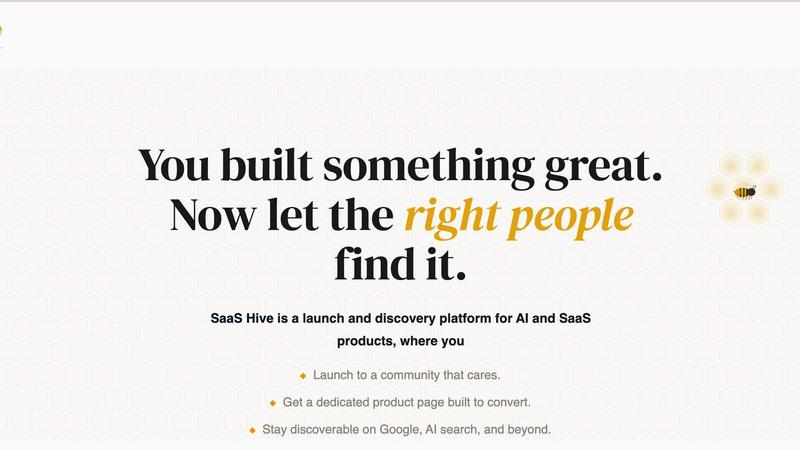
SaaS Hive helps you launch and promote your AI and SaaS products, ensuring long-term visibility and genuine user engagement.
Last updated: April 4, 2026

StreamVox provides real-time AI subtitles and translation for calls, media, and games directly on your Windows PC.
Last updated: April 4, 2026
Visual Comparison
SaaS Hive
StreamVox - AI Live Translator

Feature Comparison
SaaS Hive
Launch to a Community of Early Adopters
SaaS Hive connects founders with a vibrant community of early adopters who are eager to try new products. This feature ensures that products receive genuine feedback, upvotes, and valuable insights from engaged users who care about innovation.
Permanent, SEO-Optimized Product Pages
Every product listed on SaaS Hive comes with a dedicated page that is designed not only to convert visitors into users but also to rank well on search engines. These pages are crafted to remain discoverable over time, enhancing the product's visibility indefinitely.
Structured Categories and Comparisons
SaaS Hive organizes a multitude of AI and SaaS tools into structured categories, making it easier for users to navigate the marketplace. Side-by-side comparisons allow users to evaluate products quickly, facilitating informed decision-making.
Community-Driven Reviews and Rankings
The platform features verified reviews and community-driven rankings that empower users to assess products based on real experiences. This not only builds trust but also helps new users feel confident in their choices.
StreamVox - AI Live Translator
Universal Audio Capture & Per-App Isolation
StreamVox offers three intelligent audio capture modes: System Audio, Microphone, and Per-App Capture. The Per-App mode is a standout feature, allowing you to isolate audio from specific applications like Zoom, Chrome, or Discord. This means you can translate a meeting in one window while ignoring music or notifications from other apps. It automatically filters out background noise, ensuring the translation focuses solely on the content you need, delivering a clean and accurate subtitle feed.
Smart, Customizable Transparent Overlay
The application uses a floating overlay that stays on top of any other window or full-screen application, from video players to games. You have complete control over its appearance: adjust font size (from 12px to 72px), text color, background, and crucially, the overlay's transparency. An interactive slider lets you fine-tune opacity to make subtitles readable without obscuring your content, creating a perfect viewing experience for movies, streams, and presentations.
Bidirectional Translation & Phone Link Integration
StreamVox works in both directions. It can translate audio coming from your system (like a YouTube video) and simultaneously translate speech from your microphone for outgoing communication. Furthermore, its integration with Microsoft Phone Link is revolutionary. By connecting your iPhone or Android, you can see live subtitles for your mobile phone calls directly on your PC screen, breaking down barriers in personal and professional mobile conversations.
Extensive Language Support & Display Modes
With support for 49+ input languages and 49+ AI-powered target languages, StreamVox caters to a truly global audience. The app interface itself is available in 12 languages for ease of use. It also offers two distinct subtitle display modes: a Line-by-line mode ideal for fast-paced gaming and live chats, and a Paragraph mode for more natural reading during movies or lectures, allowing you to tailor the flow of information to the context.
Use Cases
SaaS Hive
Product Launch and Feedback Collection
Founders can use SaaS Hive to launch their products and gather immediate feedback from early adopters. This is invaluable for refining the product based on real user experiences.
Long-Term Visibility Strategy
Companies seeking to establish long-term visibility for their SaaS products can leverage SaaS Hive's SEO-optimized pages that continue to attract traffic and engagement long after launch day.
Organized Product Discovery
Users overwhelmed by the sheer volume of new tools can utilize SaaS Hive to find the right software for their needs. The organized structure and comparison features streamline the discovery process.
Building a Community Around a Product
Founders can foster a loyal community around their products by engaging with users on SaaS Hive, encouraging them to leave reviews and share their experiences, which enhances the product's credibility and reach.
StreamVox - AI Live Translator
International Business Calls & Remote Meetings
Professionals can use StreamVox to seamlessly participate in Zoom, Microsoft Teams, or Google Meet calls with international colleagues. By capturing the app-specific audio, it provides real-time translation of the conversation directly on the screen, enabling you to follow discussions and contribute effectively without language being a hurdle, fostering better collaboration in global teams.
Enjoying Foreign-Language Media & Live Streams
Movie buffs, anime fans, and viewers of international Twitch or YouTube streams no longer need to wait for official subtitles. StreamVox can capture system audio from any video player or browser tab and overlay instant translations. The customizable transparent overlay ensures you never miss a scene while reading the translated dialogue, unlocking a world of content.
Enhanced Gaming & Streaming Communication
Gamers playing on international servers or watching foreign-language esports streams can use StreamVox to understand in-game voice chat and commentator dialogue in real time. The low-latency AI and line-by-line display mode are perfect for keeping up with fast-paced action and communication, making multiplayer games more accessible and enjoyable.
Translating Mobile Calls on Your Desktop
By leveraging the Phone Link integration, users can forward their mobile calls to their PC. StreamVox then provides live subtitles for these calls on a larger screen. This is invaluable for important personal or client calls where clarity is essential, allowing for note-taking and reducing misunderstandings during conversations in a foreign language.
Overview
About SaaS Hive
SaaS Hive is an innovative and trusted platform designed specifically for the discovery and launch of AI and SaaS products. It addresses the critical need for visibility among founders while simultaneously offering users an organized and efficient way to find the right tools. By connecting these two groups within a structured and searchable marketplace, SaaS Hive ensures that great products do not get lost in the overwhelming noise of the market. Founders can list their products and benefit from permanent, SEO-optimized product pages that enhance their visibility on search engines and AI tools like ChatGPT and Perplexity. Unlike temporary launch platforms, SaaS Hive focuses on long-term discoverability, keeping product pages live, indexed, and rankable indefinitely. Each backlink, share, and mention continues to contribute to a product's visibility over time. For users, SaaS Hive transforms the daunting task of navigating thousands of newly launched tools each month into a streamlined process, featuring organized categories, side-by-side comparisons, verified reviews, and community-driven rankings. This enables faster, more confident software decisions.
About StreamVox - AI Live Translator
StreamVox is a sophisticated real-time AI translation and live subtitle application designed exclusively for Windows. It eliminates language barriers by providing instant, context-aware translation for any audio source on your PC. Whether you're in an international video call, watching foreign-language content, or playing a game with global teammates, StreamVox overlays live, translated subtitles directly onto your screen. It is built for professionals, gamers, streamers, students, and anyone who consumes multimedia content in different languages. Its core value proposition lies in its seamless, privacy-first integration into your existing workflow. Unlike pre-recorded subtitles, StreamVox delivers ultra-low latency translation powered by advanced AI, processing audio in real-time without ever storing it. With support for 49+ languages, per-app audio capture to eliminate background noise, and a fully customizable transparent overlay, it transforms your Windows desktop into a universal communication hub, making every spoken word accessible and understandable.
Frequently Asked Questions
SaaS Hive FAQ
How does SaaS Hive ensure long-term discoverability?
SaaS Hive focuses on creating permanent, SEO-optimized product pages that rank in search engines and AI tools. This ensures that products remain discoverable well beyond their launch day.
What types of products can be listed on SaaS Hive?
SaaS Hive is specifically designed for AI and SaaS products. Founders can submit a wide range of tools that cater to various needs within these categories.
How can users benefit from using SaaS Hive?
Users can benefit from SaaS Hive by accessing a structured marketplace that simplifies the process of finding and comparing new AI and SaaS tools, supported by community-driven reviews and rankings.
Is there a fee for listing products on SaaS Hive?
The current content does not specify any fees for listing products. For specific details regarding fees or pricing, it is recommended to check the official SaaS Hive website or contact their support team.
StreamVox - AI Live Translator FAQ
Is my audio data stored or sent to the cloud?
No. StreamVox is built with a privacy-first architecture. All audio processing for translation is done in real-time using on-device AI capabilities where possible and secure, ephemeral cloud processing when necessary for advanced languages. The audio is never stored on any server or saved to your disk after translation is complete.
Which applications are compatible with Per-App Capture?
StreamVox is compatible with a wide range of common audio sources. This includes communication apps like Zoom, Microsoft Teams, Discord, Skype, and Google Meet, as well as browsers (Chrome, Edge, Firefox), media players, and most PC games. You can select any running application from a list to isolate its audio.
What is the difference between Line-by-line and Paragraph mode?
Line-by-line mode displays subtitles as short, rapidly updating lines, ideal for dynamic content like live chats, gaming, or fast-paced dialogue where timing is critical. Paragraph mode displays longer, multi-line chunks of text that are more natural for reading, making it better suited for movies, lectures, or presentations where context and flow are important.
Can I use StreamVox for free, and what are the limits?
Yes, StreamVox offers a fully-featured Free Starter plan. It includes access to all 49+ languages and core features like system and microphone capture. The limit is 20 minutes of translation usage per 24-hour period, which resets daily. This allows you to test the app extensively or use it for short daily tasks without any cost.
Alternatives
SaaS Hive Alternatives
SaaS Hive is a comprehensive platform that specializes in the discovery and launch of AI and SaaS products. It serves as a structured marketplace connecting founders who seek visibility for their innovations with users looking for the right tools to match their needs. By offering permanent, SEO-optimized product pages, SaaS Hive ensures that every listed product remains discoverable over time. Users often seek alternatives to SaaS Hive for various reasons, including pricing differences, specific feature requirements, or the need for integration with other platforms. When exploring alternatives, it's crucial to consider factors such as the comprehensiveness of the product categories, the quality and reliability of user reviews, and the overall user experience. An alternative should provide the same level of organization and clarity that SaaS Hive offers, enabling informed decision-making.
StreamVox - AI Live Translator Alternatives
StreamVox - AI Live Translator is a specialized Windows application that provides real-time AI subtitles and translation for any audio on your computer. It falls into the category of live translation and accessibility software, designed to break down language barriers during calls, gaming, streaming, and media playback directly on your PC. Users often explore alternatives for various reasons. Some may seek solutions for different operating systems like macOS or mobile, require a different pricing structure, or need specific feature sets not covered by one tool. Others might prioritize deeper integration with certain communication platforms or have unique workflow requirements that demand a different approach. When evaluating other options, key considerations include the range of supported languages, the accuracy and speed of the translation, compatibility with your specific apps and operating system, and the overall user experience. It's also wise to assess the privacy policy, as these tools process spoken language, and to clearly understand any limitations of free tiers versus paid plans.