
Roast My Web vs Trafficclaw
Side-by-side comparison to help you choose the right AI tool.

Roast My Web
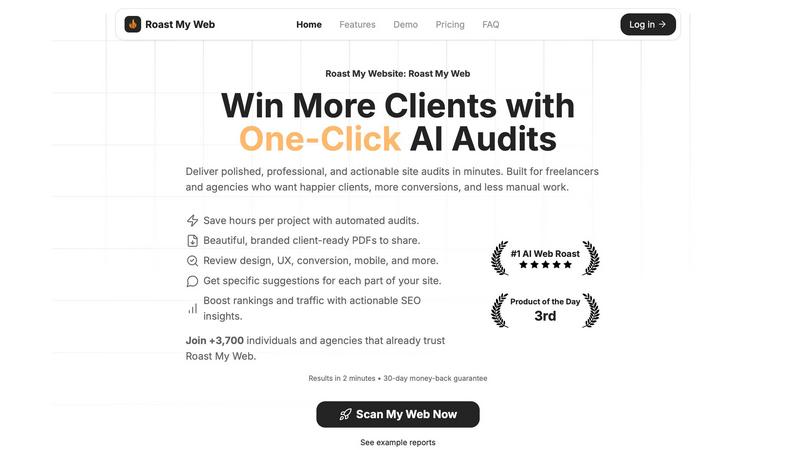
Roast My Web delivers instant AI website audits to boost sales and improve UX in minutes.
Last updated: February 28, 2026

Trafficclaw
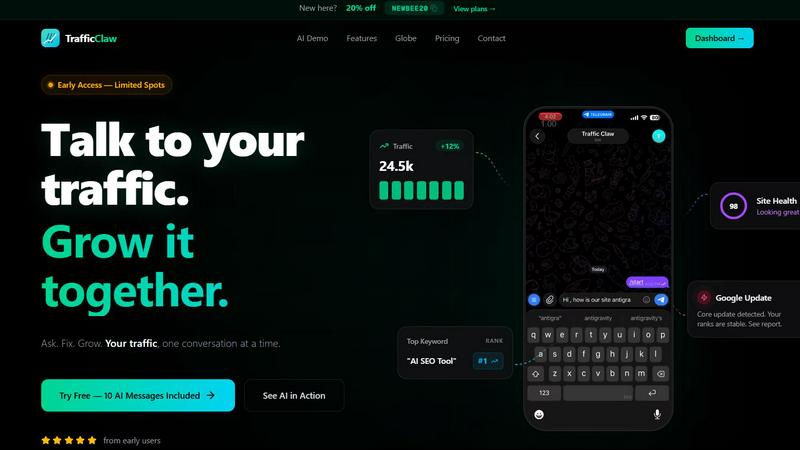
TrafficClaw is an AI analyst that answers questions and delivers growth insights from your live SEO and analytics data.
Last updated: April 13, 2026
Visual Comparison
Roast My Web
Trafficclaw
Feature Comparison
Roast My Web
Instant Conversion Wins
Get direct, actionable recommendations that target specific sections of your landing page or website. The AI identifies exactly what to change to lift sign-ups, sales, and bookings, eliminating guesswork and providing clear next steps you can implement immediately for measurable results.
Custom-Branded Reports in 60 Seconds
Present findings with maximum professionalism. With one click, you can add your agency's logo, brand colors, and custom text to every audit report. This feature generates polished, client-ready PDFs without requiring any design skills or extra time.
Manual Report Editor
Maintain full control over the final deliverable. This feature allows you to modify the AI-generated text, hide specific sections, or add your own expert advice and commentary. It ensures every report is perfectly tailored and 100% client-ready before sharing.
Cross-Device & SEO+UX Analysis
Audit your site's performance holistically in a single pass. The tool checks for critical mobile responsiveness issues to prevent user complaints, while simultaneously combining technical SEO checks with on-page UX tips. This dual approach helps boost both traffic and its conversion into leads or sales.
Trafficclaw
AI Analyst Chat
This is the core of TrafficClaw. Engage in natural language conversation with an AI trained on your live analytics and SEO data. Ask specific questions about traffic trends, user behavior, or performance drops. The AI doesn't offer blog-style advice; it analyzes your connected data sources and delivers precise verdicts with evidence, often accompanied by charts and direct insights for immediate action.
SEO Intelligence Suite
Go beyond basic rankings. This feature proactively monitors your SEO health with advanced capabilities. It detects keyword gaps you can target, alerts you to content decay on older pages, identifies cannibalization issues where your pages compete against each other, and provides tools optimized for AI search engines. It turns raw search data into a strategic growth roadmap.
Integrated Analytics Dashboard
TrafficClaw unifies critical metrics into a single, intelligently designed overview. View real-time visitor counts, traffic trends, bounce rates, and conversion funnels side-by-side with your SEO data. This eliminates the need to constantly jump between GA4, Search Console, and other platforms, providing a holistic view of your site's performance in one glance.
Live Visitor Globe & Embed
A unique visual feature that displays your real-time GA4 traffic on an interactive 3D globe. See where your current visitors are located globally, with a live activity feed showing page views and exits. You can also generate an embed code to showcase this live globe on your own website, adding dynamic social proof without any additional tracking scripts.
Use Cases
Roast My Web
For Digital Agencies & Freelancers
Agencies and freelancers use Roast My Web to streamline their audit process, saving hours per client project. It provides a consistent, high-quality baseline analysis that can be quickly customized and presented, helping to win more business, justify service value, and deliver clear, actionable roadmaps for website improvements.
For Startup Founders & Indie Hackers
Bootstrapping founders without a design or SEO background leverage the tool to audit their own landing pages. It provides detailed, expert-level insights into bugs, missing elements, and conversion blockers, enabling them to make data-informed improvements that drive sales without a large upfront investment in consultants.
For Pre-Launch Website Reviews
Teams and individuals use the tool to perform a final check on a website before launch. The cross-device peace of mind feature catches mobile and usability issues proactively, preventing the "it's broken on my phone" emails and ensuring a strong first impression for visitors.
For Competitive Analysis and Audits
Users can compare their site directly with competitor URLs within Roast My Web. This use case helps identify relative strengths and weaknesses, uncovering opportunities to outrank competitors by understanding where they excel and where your own site can gain a strategic advantage.
Trafficclaw
Diagnosing Sudden Traffic Drops
When your analytics show an unexplained traffic decline, instead of manually cross-referencing data for hours, simply ask the AI Analyst "Why did my traffic drop?" It will analyze your connected GA4 and Search Console data, pinpointing causes such as a Google algorithm update impact, a specific page losing rankings, or a technical issue, and provide the evidence-backed reason.
Uncovering Content & Keyword Opportunities
Identify growth levers without manual research. Ask questions like "What are my top untapped keyword opportunities?" or "Which old blog posts need updating?" The AI sifts through your search performance data to highlight content gaps, pages suffering from decay, and high-potential keywords you're not yet ranking for, directing your content efforts effectively.
Real-Time Website Performance Monitoring
Keep a pulse on your site's immediate activity and health. Use the unified dashboard to watch real-time visitor flow, geographic distribution, and on-site behavior concurrently with core SEO metrics. This is invaluable for monitoring campaign launches, site changes, or immediate reactions to industry news.
Streamlining Client or Stakeholder Reporting
For agencies or teams, TrafficClaw simplifies communication. The clear, conversational insights and visual dashboard provide an easily digestible snapshot of performance. You can quickly generate answers to specific stakeholder questions or use the live embed globe to transparently showcase site activity and engagement directly to clients.
Overview
About Roast My Web
Roast My Web is an AI-powered website audit tool designed to deliver professional, client-ready analysis in just two minutes. It transforms any URL into a comprehensive PDF report that identifies critical issues hindering user experience, trust, and conversions. Built for digital agencies, freelancers, indie hackers, and founders, the tool automates what was once a manual, hours-long process. Its core value proposition is efficiency and actionable insight: it provides specific, section-by-section fixes for design, UX, conversion optimization, mobile responsiveness, and SEO, all without sugarcoating the feedback. By packaging these findings into beautiful, custom-branded reports, Roast My Web empowers users to stand out, win more client business, and implement changes that directly boost sales and rankings. It’s the fastest roast in the market, trusted by over 3,700 individuals and agencies to save time, impress clients, and unlock revenue.
About Trafficclaw
TrafficClaw is an AI-powered analytics command center designed to cut through the noise of traditional data tools. It transforms the complex, often frustrating task of understanding website performance into a simple conversation. By connecting directly to your Google Analytics 4 and Google Search Console accounts, TrafficClaw provides an AI analyst with real-time access to your data. Instead of staring at static graphs and exporting spreadsheets, you can ask direct questions like "Why did my traffic drop last Tuesday?" or "What are my top keyword opportunities?" and receive specific, actionable verdicts backed by your own metrics. It's built for website owners, marketers, and developers who value their time and seek direct, intelligent insights over generic advice. The core promise is effortless growth: stop switching between tabs, start having a dialogue with your data, and get clear fixes to drive your traffic forward.
Frequently Asked Questions
Roast My Web FAQ
How long does an audit take?
An AI website audit with Roast My Web is completed in approximately two minutes. You simply paste a URL, and the system generates a comprehensive, client-ready report with actionable insights in that short timeframe.
What kind of issues does the tool identify?
The audit provides a blunt analysis across multiple critical areas. This includes design flaws, user experience (UX) hurdles, conversion optimization opportunities, mobile responsiveness problems, and actionable SEO insights to boost traffic and rankings.
Can I customize the generated reports?
Yes, extensively. The platform includes a Manual Report Editor that allows you to modify text, hide sections, or add your own advice. Furthermore, you can fully brand the PDF with your logo and colors in about 60 seconds for a professional presentation.
What is your refund policy?
Roast My Web offers a 30-day money-back guarantee. If you are not satisfied with the tool or the insights it provides, you can request a full refund within the first 30 days of your purchase, no questions asked.
Trafficclaw FAQ
How does TrafficClaw access my data?
TrafficClaw uses secure, read-only Google OAuth to connect to your Google Analytics 4 and Search Console accounts. This means we never see your password, and our access is limited to viewing your analytics data only. Your data remains in your Google account and is not sold or used for training public AI models.
What makes the AI advice different from generic tips?
The AI Analyst is fundamentally different because it operates on your live, first-party data. Instead of giving general best practices, it analyzes your specific traffic patterns, keyword rankings, and user behavior to deliver personalized verdicts. The insight "your traffic dropped because page X lost its #3 ranking for keyword Y" is actionable, whereas "create better content" is not.
Is there a setup or coding required?
Setup takes less than a minute and requires no coding. You simply sign in with Google, grant read-only permissions to your GA4 and Search Console properties, and TrafficClaw auto-detects and imports your data. Your dashboard and AI Analyst are ready to use immediately after.
Can I use the Live Globe on my website?
Yes. The Live Visitor Globe is a feature available to all users. You can generate a unique embed code from your TrafficClaw dashboard and insert it as a simple iframe into any webpage, CMS like WordPress, or custom-coded site. It will then display real-time visitor data from your connected GA4 property without requiring any additional tracking code on your site.
Alternatives
Roast My Web Alternatives
Roast My Web is a specialized AI tool in the website audit and business intelligence category. It delivers rapid, client-ready reports focused on UX, SEO, and conversion optimization, making it a valuable asset for agencies and consultants. Users often explore alternatives for various reasons. Needs can differ based on budget, the desire for deeper analytics, integration with other platforms, or a preference for real-time monitoring over snapshot reports. The ideal tool varies by project scope and business maturity. When evaluating other options, consider the audit's depth, reporting customization, the specificity of its recommendations, and how it fits into your existing workflow. The goal is to find a solution that provides clear, actionable insights tailored to your or your client's strategic objectives.
Trafficclaw Alternatives
Trafficclaw is an AI assistant for SEO and analytics, designed to translate complex data into actionable insights. It connects to platforms like Google Analytics and Search Console, allowing users to ask direct questions about their traffic and performance to receive clear, data-backed answers. Users explore alternatives for various reasons, such as budget constraints, the need for different feature sets, or integration with a broader tech stack. Some may require more advanced reporting, team collaboration tools, or support for additional data sources beyond the core offerings. When evaluating other solutions, prioritize tools that offer genuine conversational analysis, not just dashboards. Look for robust, secure data connections, transparent pricing, and a focus on delivering specific, corrective insights rather than just surfacing problems.