
Rallied AI vs StreamVox - AI Live Translator
Side-by-side comparison to help you choose the right AI tool.

Rallied AI
Rallied is an AI technician that autonomously resolves IT support tickets for MSPs.
Last updated: April 4, 2026

StreamVox provides real-time AI subtitles and translation for calls, media, and games directly on your Windows PC.
Last updated: April 4, 2026
Visual Comparison
Rallied AI
StreamVox - AI Live Translator

Feature Comparison
Rallied AI
Autonomous Ticket Resolution
Rallied AI doesn't just triage or suggest—it executes. The AI technician autonomously performs the actual remediation for common L1 and L2 issues such as password resets, account unlocks, mailbox permission changes, and group membership updates. It connects to systems like Microsoft 365, Entra ID, and Okta to perform these actions, then automatically notifies the user and closes or updates the ticket in the connected PSA, providing a complete, hands-off resolution cycle.
Natural Language Interface in Slack/Teams
Technicians can interact with Rallied AI as if it were a real team member through natural conversation in Slack or Microsoft Teams. Users can assign tasks, ask for status updates, or request actions through simple chat messages. This feature integrates the AI's capabilities directly into the daily communication flow, eliminating the need to switch between multiple applications and making advanced automation accessible to every team member through a familiar interface.
Intelligent Triage and Dispatch
Before a human technician ever sees a ticket, Rallied AI can intercept and qualify it. The AI asks the end-user pertinent questions to gather necessary details, accurately categorizes the issue, sets the correct priority, populates triage fields, and can even pull relevant documentation from IT Glue or Hudu. It then intelligently routes the ticket to the appropriate queue or technician, ensuring efficient workflow and faster initial response times.
Proactive Onboarding and Offboarding Workflows
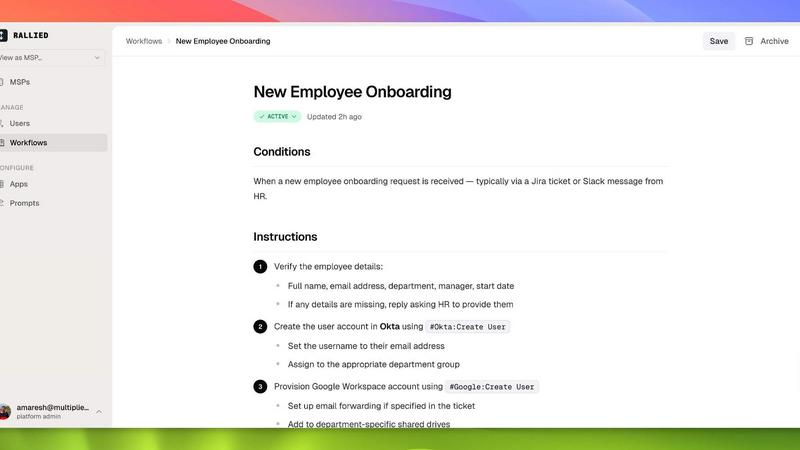
Rallied AI automates complex, multi-step processes like employee onboarding and offboarding. From a single message or ticket, it can trigger a sequence of actions: creating an AD account, assigning M365 licenses, adding users to security groups, deploying the RMM agent, and updating the PSA. For offboarding, it can schedule access revocation and license reclamation. This ensures consistency, reduces manual errors, and frees up engineers for project-based work.
StreamVox - AI Live Translator
Universal Audio Capture & Per-App Isolation
StreamVox offers three intelligent audio capture modes: System Audio, Microphone, and Per-App Capture. The Per-App mode is a standout feature, allowing you to isolate audio from specific applications like Zoom, Chrome, or Discord. This means you can translate a meeting in one window while ignoring music or notifications from other apps. It automatically filters out background noise, ensuring the translation focuses solely on the content you need, delivering a clean and accurate subtitle feed.
Smart, Customizable Transparent Overlay
The application uses a floating overlay that stays on top of any other window or full-screen application, from video players to games. You have complete control over its appearance: adjust font size (from 12px to 72px), text color, background, and crucially, the overlay's transparency. An interactive slider lets you fine-tune opacity to make subtitles readable without obscuring your content, creating a perfect viewing experience for movies, streams, and presentations.
Bidirectional Translation & Phone Link Integration
StreamVox works in both directions. It can translate audio coming from your system (like a YouTube video) and simultaneously translate speech from your microphone for outgoing communication. Furthermore, its integration with Microsoft Phone Link is revolutionary. By connecting your iPhone or Android, you can see live subtitles for your mobile phone calls directly on your PC screen, breaking down barriers in personal and professional mobile conversations.
Extensive Language Support & Display Modes
With support for 49+ input languages and 49+ AI-powered target languages, StreamVox caters to a truly global audience. The app interface itself is available in 12 languages for ease of use. It also offers two distinct subtitle display modes: a Line-by-line mode ideal for fast-paced gaming and live chats, and a Paragraph mode for more natural reading during movies or lectures, allowing you to tailor the flow of information to the context.
Use Cases
Rallied AI
Freeing Up Senior Engineers from Repetitive Tasks
MSPs often find their highest-paid Level 2 and 3 engineers bogged down resetting passwords and unlocking accounts. This represents significant margin erosion. Rallied AI autonomously handles these repetitive L1/L2 tickets, allowing senior engineers to redirect their expertise toward billable project work, security initiatives, and other strategic tasks that directly contribute to business growth and client satisfaction.
Scaling Operations Without Adding Headcount
Growing MSPs facing increasing ticket volume are often caught between the high cost and long ramp-up time of hiring a new L1 technician and the risk of declining service quality. Rallied AI acts as a force multiplier, capable of handling hundreds of tickets per month from day one. This allows the business to scale service delivery efficiently without the immediate overhead and recruitment challenges associated with new hires.
Replacing Ineffective or High-Maintenance Automation
Many MSPs have experimented with other AI or automation platforms only to find they require a nearly full-time administrator, months of complex setup, and still only provide suggestions rather than execution. Rallied AI is built for rapid deployment and autonomous action. It connects to an MSP's stack within the same week and begins resolving tickets independently, delivering tangible ROI without becoming a management burden.
Ensuring Consistent and Auditable Process Execution
Manual processes for onboarding, offboarding, and access changes are prone to human error and inconsistency. Rallied AI executes predefined workflows perfectly every time, ensuring compliance with security policies. Every action is logged as an internal note in the PSA, providing a clear, auditable trail of what was done, by the AI, and when, which enhances operational transparency and security posture.
StreamVox - AI Live Translator
International Business Calls & Remote Meetings
Professionals can use StreamVox to seamlessly participate in Zoom, Microsoft Teams, or Google Meet calls with international colleagues. By capturing the app-specific audio, it provides real-time translation of the conversation directly on the screen, enabling you to follow discussions and contribute effectively without language being a hurdle, fostering better collaboration in global teams.
Enjoying Foreign-Language Media & Live Streams
Movie buffs, anime fans, and viewers of international Twitch or YouTube streams no longer need to wait for official subtitles. StreamVox can capture system audio from any video player or browser tab and overlay instant translations. The customizable transparent overlay ensures you never miss a scene while reading the translated dialogue, unlocking a world of content.
Enhanced Gaming & Streaming Communication
Gamers playing on international servers or watching foreign-language esports streams can use StreamVox to understand in-game voice chat and commentator dialogue in real time. The low-latency AI and line-by-line display mode are perfect for keeping up with fast-paced action and communication, making multiplayer games more accessible and enjoyable.
Translating Mobile Calls on Your Desktop
By leveraging the Phone Link integration, users can forward their mobile calls to their PC. StreamVox then provides live subtitles for these calls on a larger screen. This is invaluable for important personal or client calls where clarity is essential, allowing for note-taking and reducing misunderstandings during conversations in a foreign language.
Overview
About Rallied AI
Rallied AI is an autonomous AI technician built specifically for Managed Service Providers (MSPs). It is designed to connect directly to an MSP's entire technology stack—including PSA, RMM, identity management, and documentation platforms—to autonomously resolve Level 1 and Level 2 support tickets. Unlike tools that merely suggest next steps, Rallied AI executes the fix, notifies the end-user, and updates the ticket without human intervention. It integrates seamlessly into existing workflows, allowing technicians to interact with it as a coworker via Slack or Microsoft Teams, or by letting it work directly within the PSA. The core value proposition is the immediate recovery of 50-100 hours per month of high-value engineer time currently lost to repetitive, low-complexity tasks, thereby improving operational margins and enabling business growth. It is built for MSP owners and service managers who are constrained by headcount, burdened by high ticket volume, or disillusioned by previous AI tools that required extensive setup and ongoing management.
About StreamVox - AI Live Translator
StreamVox is a sophisticated real-time AI translation and live subtitle application designed exclusively for Windows. It eliminates language barriers by providing instant, context-aware translation for any audio source on your PC. Whether you're in an international video call, watching foreign-language content, or playing a game with global teammates, StreamVox overlays live, translated subtitles directly onto your screen. It is built for professionals, gamers, streamers, students, and anyone who consumes multimedia content in different languages. Its core value proposition lies in its seamless, privacy-first integration into your existing workflow. Unlike pre-recorded subtitles, StreamVox delivers ultra-low latency translation powered by advanced AI, processing audio in real-time without ever storing it. With support for 49+ languages, per-app audio capture to eliminate background noise, and a fully customizable transparent overlay, it transforms your Windows desktop into a universal communication hub, making every spoken word accessible and understandable.
Frequently Asked Questions
Rallied AI FAQ
What if it breaks something?
You maintain full control over Rallied AI's permissions and autonomy. During setup, you define exactly what actions it can perform autonomously and which require explicit human approval first. As your team gains confidence and comfort with the AI's performance, you can gradually expand its scope of independent action, ensuring a safe and controlled adoption process that minimizes risk.
We've tried AI tools before. How is this different?
Rallied AI is built on the principle of execution, not just suggestion. Unlike tools that analyze a ticket and propose a next step for a human to perform, Rallied connects directly to your systems to perform the fix itself. Furthermore, it is designed for rapid deployment—connecting to your stack and beginning work within a week—without requiring a dedicated full-time administrator or months of training and configuration.
How quickly can we get started with Rallied AI?
The implementation process is remarkably fast. After an initial kickoff call to map your stack and scope workflows, the Rallied team connects your tools and sets permissions. The AI can be live and processing tickets within the same week. This is followed by a 30-day free trial where a forward-deployed engineer fine-tunes workflows, ensuring a smooth and effective launch.
What kind of tickets can Rallied AI actually resolve?
Rallied AI specializes in autonomously resolving a wide range of common Level 1 and Level 2 support tickets. This includes password resets, Active Directory/M365 account unlocks, managing mailbox permissions and distribution group memberships, VPN access issues, and executing standardized onboarding/offboarding workflows. It handles the entire process from detection to resolution and documentation.
StreamVox - AI Live Translator FAQ
Is my audio data stored or sent to the cloud?
No. StreamVox is built with a privacy-first architecture. All audio processing for translation is done in real-time using on-device AI capabilities where possible and secure, ephemeral cloud processing when necessary for advanced languages. The audio is never stored on any server or saved to your disk after translation is complete.
Which applications are compatible with Per-App Capture?
StreamVox is compatible with a wide range of common audio sources. This includes communication apps like Zoom, Microsoft Teams, Discord, Skype, and Google Meet, as well as browsers (Chrome, Edge, Firefox), media players, and most PC games. You can select any running application from a list to isolate its audio.
What is the difference between Line-by-line and Paragraph mode?
Line-by-line mode displays subtitles as short, rapidly updating lines, ideal for dynamic content like live chats, gaming, or fast-paced dialogue where timing is critical. Paragraph mode displays longer, multi-line chunks of text that are more natural for reading, making it better suited for movies, lectures, or presentations where context and flow are important.
Can I use StreamVox for free, and what are the limits?
Yes, StreamVox offers a fully-featured Free Starter plan. It includes access to all 49+ languages and core features like system and microphone capture. The limit is 20 minutes of translation usage per 24-hour period, which resets daily. This allows you to test the app extensively or use it for short daily tasks without any cost.
Alternatives
Rallied AI Alternatives
Rallied AI is a specialized software solution for Managed Service Providers (MSPs). It functions as an autonomous AI technician, designed to connect with your existing tools and independently resolve Level 1 and Level 2 support tickets. It operates through familiar chat platforms like Slack and Microsoft Teams or works directly within your Professional Services Automation (PSA) system. Users may explore alternatives for various reasons. This could be due to specific budget constraints, a need for different feature integrations, or a preference for a platform that aligns with a particular service stack or operational workflow. The search often centers on finding the right balance of automation, compatibility, and value. When evaluating options, focus on core capabilities. Key considerations include the depth of autonomous ticket resolution, the breadth of native integrations with essential MSP tools, and the flexibility of deployment and interaction methods. The goal is to find a solution that seamlessly extends your team's capacity without adding complexity.
StreamVox - AI Live Translator Alternatives
StreamVox - AI Live Translator is a specialized Windows application that provides real-time AI subtitles and translation for any audio on your computer. It falls into the category of live translation and accessibility software, designed to break down language barriers during calls, gaming, streaming, and media playback directly on your PC. Users often explore alternatives for various reasons. Some may seek solutions for different operating systems like macOS or mobile, require a different pricing structure, or need specific feature sets not covered by one tool. Others might prioritize deeper integration with certain communication platforms or have unique workflow requirements that demand a different approach. When evaluating other options, key considerations include the range of supported languages, the accuracy and speed of the translation, compatibility with your specific apps and operating system, and the overall user experience. It's also wise to assess the privacy policy, as these tools process spoken language, and to clearly understand any limitations of free tiers versus paid plans.