
QuickData.ai vs Z Image Turbo
Side-by-side comparison to help you choose the right AI tool.

QuickData.ai
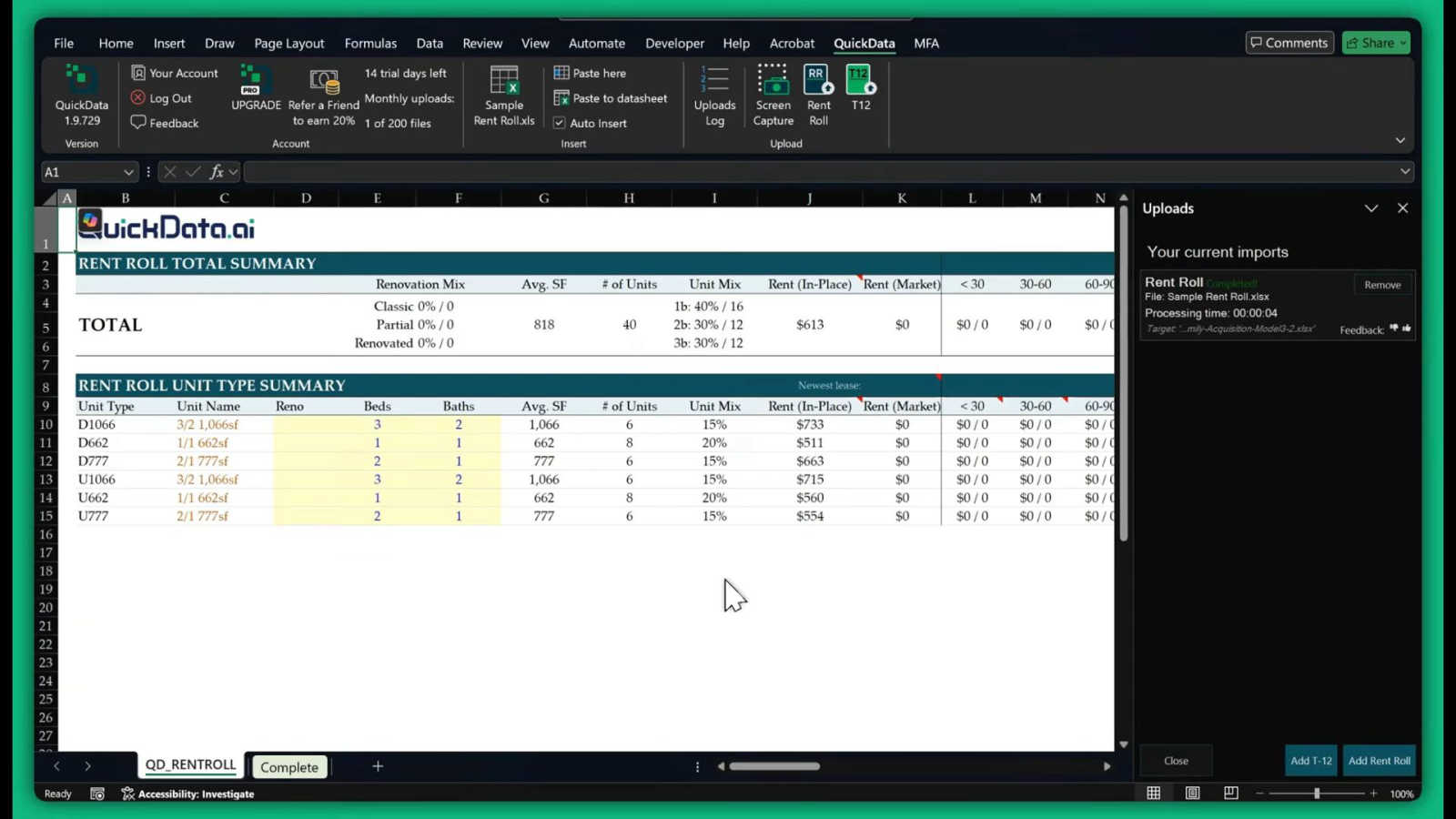
QuickData.ai automates multifamily rent roll and T12 data entry into Excel, accelerating underwriting tenfold.
Last updated: March 1, 2026

Z Image Turbo
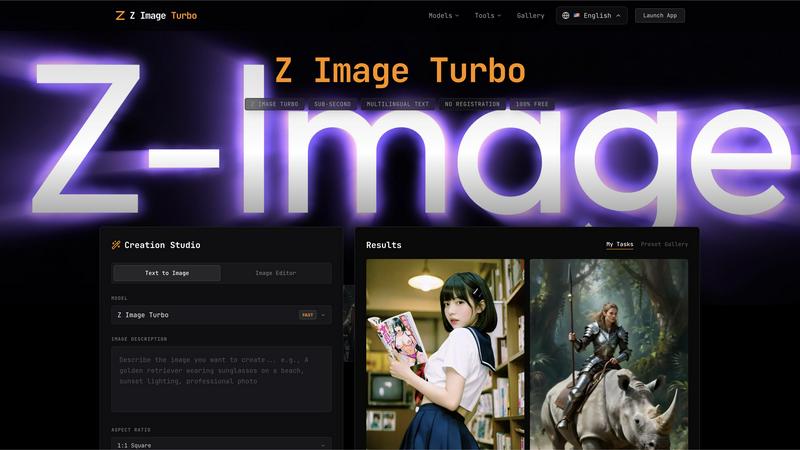
Z Image Turbo generates stunning 4K images in under one second with multilingual support, all completely free.
Last updated: February 27, 2026
Visual Comparison
QuickData.ai
Z Image Turbo
Feature Comparison
QuickData.ai
AI-Powered Data Extraction
QuickData.ai utilizes advanced artificial intelligence to intelligently parse complex multifamily financial documents. It accurately identifies and extracts key data points from Rent Rolls, T12s, and OMs, regardless of the document's original format or layout. This feature eliminates the need for manual copying and pasting, ensuring data flows directly from the source into your model with precision.
Seamless Excel Integration
The tool operates entirely within Microsoft Excel as a native add-in. Extracted data is instantly formatted and populated directly into your existing underwriting models or templates. This seamless integration means there is no disruptive switching between applications or complex data exports, maintaining your established workflow while supercharging its efficiency.
Dedicated Multifamily Excel Model
For users seeking a complete solution, QuickData.ai offers a proprietary, professionally built Multifamily Excel Underwriting Model. This model is pre-configured to work optimally with the AI extraction tool, providing a robust, industry-standard framework for financial analysis, cash flow projections, and investment evaluation right out of the box.
Free 1:1 Onboarding & Setup
QuickData.ai ensures users can realize value immediately by offering complimentary, personalized onboarding sessions. Their team provides direct, one-on-one guidance to install the add-in, integrate it with your processes, and demonstrate its capabilities, guaranteeing you can start automating data entry in just minutes.
Z Image Turbo
Sub-Second Generation
Z Image Turbo boasts an optimized inference pipeline that allows users to generate photorealistic images in under one second. This remarkable speed is achieved through an advanced 8-step diffusion process, making it ideal for users who require immediate results without sacrificing quality.
Accurate Multilingual Text Rendering
One of the standout features of Z Image Turbo is its ability to render text accurately in over 10 languages, including English and Chinese. This functionality is perfect for creating marketing materials, posters, and book covers without the worry of garbled letters or incorrect translations.
Consistent Character Identity
Z Image Turbo ensures that character identities remain consistent across multiple generations. This feature is particularly beneficial for storytellers and brands that rely on recognizable mascots or characters, allowing them to maintain the same look and style in various contexts.
Precise Camera Control
With Z Image Turbo, users have full control over virtual camera parameters, including depth of field and angle settings. The platform offers over 50 lens simulations, enabling creators to achieve the desired composition, lighting, and overall look for their images with precision.
Use Cases
QuickData.ai
Accelerating Acquisitions Underwriting
Acquisitions analysts and associates can rapidly evaluate potential deals. Instead of spending hours manually inputting unit mixes, rental income, and expense data from OMs and T12s, QuickData.ai populates their model instantly. This allows teams to analyze more properties, identify the best opportunities faster, and move decisively in competitive markets.
Enhancing Broker Deal Preparation
Commercial real estate brokers preparing marketing packages and offering memorandums can use QuickData.ai to quickly reverse-engineer data. They can efficiently extract historical performance data from a seller's documents to build accurate and compelling financial proformas and investment summaries for prospective buyers, streamlining the entire sales preparation process.
Streamlining Lender Due Diligence
Lenders and debt underwriters conducting due diligence on multifamily loan applications can automate the verification of property financials. By quickly extracting data from provided rent rolls and T12s into their own analysis templates, they can more efficiently assess property performance, validate metrics, and accelerate the credit decision process.
Optimizing Accounting Firm Audits
Accounting firms servicing multifamily real estate clients can use QuickData.ai to swiftly gather and organize financial data from various client documents for audit, tax preparation, or financial reporting. This reduces the manual data collection burden, minimizes transcription errors, and allows professionals to focus on higher-value advisory services.
Z Image Turbo
Marketing and Advertising
Businesses can leverage Z Image Turbo to create eye-catching marketing visuals in minutes. From promotional banners to product shots, the platform's speed and multilingual capabilities make it an invaluable tool for marketers looking to engage a diverse audience.
Character Design and Development
Artists and game developers can use Z Image Turbo to generate consistent character designs quickly. Whether for animation, gaming, or comics, the tool helps maintain character fidelity across various scenes, streamlining the creative process.
Social Media Content Creation
Content creators can utilize Z Image Turbo to produce high-quality images for their social media platforms. With the ability to generate images in various styles and formats, users can keep their feeds fresh and engaging without investing significant time.
Educational and Presentational Materials
Educators and professionals can create visually appealing presentations and educational materials using Z Image Turbo. The tool's accurate text rendering and diverse style options allow users to produce materials that are both informative and visually captivating.
Overview
About QuickData.ai
QuickData.ai is a specialized AI-powered Excel add-in engineered for the multifamily real estate industry. It directly addresses one of the sector's most time-consuming bottlenecks: manually extracting and entering data from critical financial documents into underwriting models. The tool automates the ingestion of data from Rent Rolls, T12 (Trailing 12-Month) statements, and Offering Memorandums (OMs), transforming unstructured PDFs and documents into clean, organized data within Excel in seconds. It is built for professionals who drive deals forward, including acquisitions teams, commercial real estate brokers, lenders, and accounting firms. The core value proposition is profound efficiency. By eliminating error-prone manual entry, QuickData.ai empowers users to underwrite deals 10x faster, reclaim an average of 15 hours per month, and confidently analyze more opportunities. This isn't just about speed; it's about enhancing accuracy and strategic focus, allowing experts to spend their time on analysis and negotiation rather than data processing.
About Z Image Turbo
Z Image Turbo is a cutting-edge AI image generation tool designed to create stunning, high-quality 4K photorealistic images in mere seconds. It stands out in the competitive landscape of image generators by offering sub-second rendering capabilities, which is ten times faster than many alternatives. Whether you are a marketer, content creator, or simply someone who appreciates high-quality visuals, Z Image Turbo caters to your needs by allowing you to generate images without any registration or costs. With advanced models like GPT Image 1.5, Flux 2, and Seedream 4.5, users can experiment with various styles and formats, ensuring that they receive tailor-made visuals that meet their specific requirements. The platform's multilingual text rendering capabilities enhance its usability for global audiences, making it the perfect choice for anyone looking to create professional-grade images quickly and efficiently.
Frequently Asked Questions
QuickData.ai FAQ
What types of documents does QuickData.ai work with?
QuickData.ai is specifically trained to work with the key documents used in multifamily real estate underwriting. This includes Rent Rolls (listing unit-by-unit details), T12 statements (Trailing 12-Month income and expenses), and Offering Memorandums (OMs). It processes these documents, typically in PDF format, to extract the relevant financial and operational data.
Do I need a special Excel model to use the add-in?
No, you do not. A primary feature of QuickData.ai is its flexibility to work with your existing Excel underwriting models and templates. The AI extracts the data and allows you to map it directly into your own spreadsheet's structure. For those who want one, a pre-built Multifamily Excel Model is also available for purchase.
How accurate is the AI data extraction?
The AI is highly accurate and built specifically for the structure and terminology of multifamily financials. It is designed to identify and extract key data points with precision. The process also allows for quick user review and validation within Excel, ensuring the final data in your model is correct before you proceed with your analysis.
Is there a free trial available?
Yes, QuickData.ai offers a full-featured 14-day free trial. This allows you to test the AI extraction capabilities with your own documents and integrate it into your workflow without any initial commitment. You can start the trial directly from their website.
Z Image Turbo FAQ
What types of images can I generate with Z Image Turbo?
Z Image Turbo allows you to create a wide range of images, including photorealistic visuals, illustrations, character designs, and more. You can choose from over 50 styles to suit your needs.
Do I need to register to use Z Image Turbo?
No, Z Image Turbo is completely free to use, and there is no registration required. You can start generating images immediately after accessing the platform.
Is there a limit to the number of images I can create?
Z Image Turbo does not impose any limits on the number of images you can generate. You can create as many images as you want, allowing for endless creative possibilities.
What formats can I export my images in?
You can export your generated images in multiple formats, including PNG, JPG, and WebP. This flexibility ensures that your images are ready for various applications, from web use to print.
Alternatives
QuickData.ai Alternatives
QuickData.ai is an AI-powered Excel add-in that automates data extraction from rent rolls and T12 statements for multifamily real estate underwriting. It belongs to the category of specialized AI assistants for business and finance, designed to save analysts significant time and reduce manual errors. Users may explore alternatives for various reasons, including budget constraints, a need for different platform integrations beyond Excel, or a desire for a broader set of features beyond core rent roll and T12 parsing. The search often stems from finding the perfect balance between specialized functionality and overall value. When evaluating options, key considerations should include the tool's accuracy in parsing complex financial documents, its seamless integration into your existing workflow, the depth of data extraction capabilities, and the overall time savings it demonstrably provides. The goal is to find a solution that enhances productivity without introducing new complexities.
Z Image Turbo Alternatives
Z Image Turbo is an innovative AI image generator that specializes in creating high-quality 4K photorealistic images in mere seconds. As part of the AI Assistants and Tech Tools category, it stands out for its multilingual text rendering capabilities, allowing users to generate images without the need for registration. However, users often seek alternatives to Z Image Turbo for various reasons, including specific feature sets, pricing structures, or compatibility with different platforms. When exploring alternatives, it is essential to consider factors such as image quality, ease of use, and the overall versatility of the tool to ensure it meets your unique creative needs.