
QuickData.ai vs Trafficclaw
Side-by-side comparison to help you choose the right AI tool.

QuickData.ai
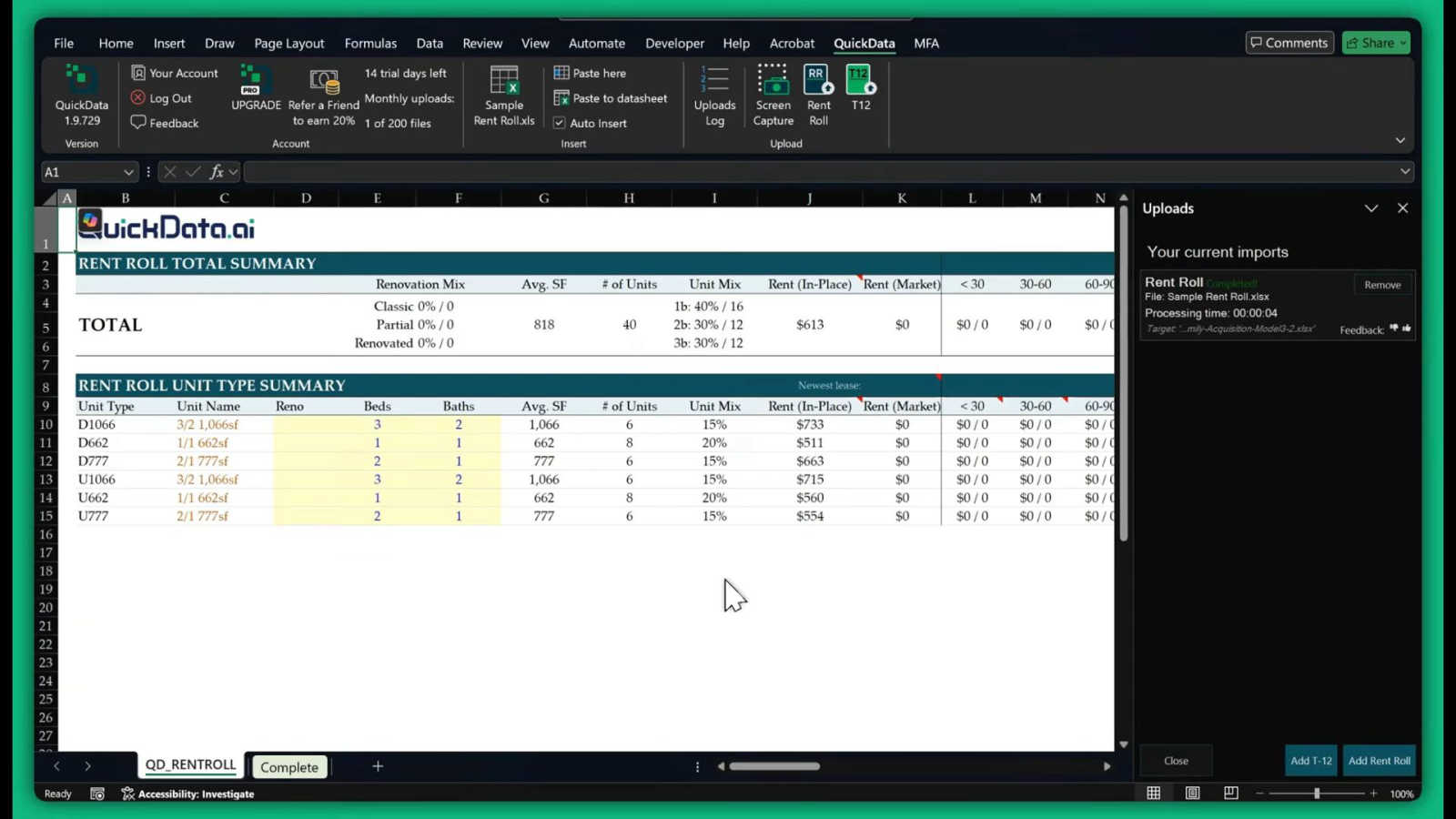
QuickData.ai automates multifamily rent roll and T12 data entry into Excel, accelerating underwriting tenfold.
Last updated: March 1, 2026

Trafficclaw
TrafficClaw is an AI analyst that answers questions and delivers growth insights from your live SEO and analytics data.
Last updated: April 13, 2026
Visual Comparison
QuickData.ai
Trafficclaw

Feature Comparison
QuickData.ai
AI-Powered Data Extraction
QuickData.ai utilizes advanced artificial intelligence to intelligently parse complex multifamily financial documents. It accurately identifies and extracts key data points from Rent Rolls, T12s, and OMs, regardless of the document's original format or layout. This feature eliminates the need for manual copying and pasting, ensuring data flows directly from the source into your model with precision.
Seamless Excel Integration
The tool operates entirely within Microsoft Excel as a native add-in. Extracted data is instantly formatted and populated directly into your existing underwriting models or templates. This seamless integration means there is no disruptive switching between applications or complex data exports, maintaining your established workflow while supercharging its efficiency.
Dedicated Multifamily Excel Model
For users seeking a complete solution, QuickData.ai offers a proprietary, professionally built Multifamily Excel Underwriting Model. This model is pre-configured to work optimally with the AI extraction tool, providing a robust, industry-standard framework for financial analysis, cash flow projections, and investment evaluation right out of the box.
Free 1:1 Onboarding & Setup
QuickData.ai ensures users can realize value immediately by offering complimentary, personalized onboarding sessions. Their team provides direct, one-on-one guidance to install the add-in, integrate it with your processes, and demonstrate its capabilities, guaranteeing you can start automating data entry in just minutes.
Trafficclaw
AI Analyst Chat
This is the core of TrafficClaw. Engage in natural language conversation with an AI trained on your live analytics and SEO data. Ask specific questions about traffic trends, user behavior, or performance drops. The AI doesn't offer blog-style advice; it analyzes your connected data sources and delivers precise verdicts with evidence, often accompanied by charts and direct insights for immediate action.
SEO Intelligence Suite
Go beyond basic rankings. This feature proactively monitors your SEO health with advanced capabilities. It detects keyword gaps you can target, alerts you to content decay on older pages, identifies cannibalization issues where your pages compete against each other, and provides tools optimized for AI search engines. It turns raw search data into a strategic growth roadmap.
Integrated Analytics Dashboard
TrafficClaw unifies critical metrics into a single, intelligently designed overview. View real-time visitor counts, traffic trends, bounce rates, and conversion funnels side-by-side with your SEO data. This eliminates the need to constantly jump between GA4, Search Console, and other platforms, providing a holistic view of your site's performance in one glance.
Live Visitor Globe & Embed
A unique visual feature that displays your real-time GA4 traffic on an interactive 3D globe. See where your current visitors are located globally, with a live activity feed showing page views and exits. You can also generate an embed code to showcase this live globe on your own website, adding dynamic social proof without any additional tracking scripts.
Use Cases
QuickData.ai
Accelerating Acquisitions Underwriting
Acquisitions analysts and associates can rapidly evaluate potential deals. Instead of spending hours manually inputting unit mixes, rental income, and expense data from OMs and T12s, QuickData.ai populates their model instantly. This allows teams to analyze more properties, identify the best opportunities faster, and move decisively in competitive markets.
Enhancing Broker Deal Preparation
Commercial real estate brokers preparing marketing packages and offering memorandums can use QuickData.ai to quickly reverse-engineer data. They can efficiently extract historical performance data from a seller's documents to build accurate and compelling financial proformas and investment summaries for prospective buyers, streamlining the entire sales preparation process.
Streamlining Lender Due Diligence
Lenders and debt underwriters conducting due diligence on multifamily loan applications can automate the verification of property financials. By quickly extracting data from provided rent rolls and T12s into their own analysis templates, they can more efficiently assess property performance, validate metrics, and accelerate the credit decision process.
Optimizing Accounting Firm Audits
Accounting firms servicing multifamily real estate clients can use QuickData.ai to swiftly gather and organize financial data from various client documents for audit, tax preparation, or financial reporting. This reduces the manual data collection burden, minimizes transcription errors, and allows professionals to focus on higher-value advisory services.
Trafficclaw
Diagnosing Sudden Traffic Drops
When your analytics show an unexplained traffic decline, instead of manually cross-referencing data for hours, simply ask the AI Analyst "Why did my traffic drop?" It will analyze your connected GA4 and Search Console data, pinpointing causes such as a Google algorithm update impact, a specific page losing rankings, or a technical issue, and provide the evidence-backed reason.
Uncovering Content & Keyword Opportunities
Identify growth levers without manual research. Ask questions like "What are my top untapped keyword opportunities?" or "Which old blog posts need updating?" The AI sifts through your search performance data to highlight content gaps, pages suffering from decay, and high-potential keywords you're not yet ranking for, directing your content efforts effectively.
Real-Time Website Performance Monitoring
Keep a pulse on your site's immediate activity and health. Use the unified dashboard to watch real-time visitor flow, geographic distribution, and on-site behavior concurrently with core SEO metrics. This is invaluable for monitoring campaign launches, site changes, or immediate reactions to industry news.
Streamlining Client or Stakeholder Reporting
For agencies or teams, TrafficClaw simplifies communication. The clear, conversational insights and visual dashboard provide an easily digestible snapshot of performance. You can quickly generate answers to specific stakeholder questions or use the live embed globe to transparently showcase site activity and engagement directly to clients.
Overview
About QuickData.ai
QuickData.ai is a specialized AI-powered Excel add-in engineered for the multifamily real estate industry. It directly addresses one of the sector's most time-consuming bottlenecks: manually extracting and entering data from critical financial documents into underwriting models. The tool automates the ingestion of data from Rent Rolls, T12 (Trailing 12-Month) statements, and Offering Memorandums (OMs), transforming unstructured PDFs and documents into clean, organized data within Excel in seconds. It is built for professionals who drive deals forward, including acquisitions teams, commercial real estate brokers, lenders, and accounting firms. The core value proposition is profound efficiency. By eliminating error-prone manual entry, QuickData.ai empowers users to underwrite deals 10x faster, reclaim an average of 15 hours per month, and confidently analyze more opportunities. This isn't just about speed; it's about enhancing accuracy and strategic focus, allowing experts to spend their time on analysis and negotiation rather than data processing.
About Trafficclaw
TrafficClaw is an AI-powered analytics command center designed to cut through the noise of traditional data tools. It transforms the complex, often frustrating task of understanding website performance into a simple conversation. By connecting directly to your Google Analytics 4 and Google Search Console accounts, TrafficClaw provides an AI analyst with real-time access to your data. Instead of staring at static graphs and exporting spreadsheets, you can ask direct questions like "Why did my traffic drop last Tuesday?" or "What are my top keyword opportunities?" and receive specific, actionable verdicts backed by your own metrics. It's built for website owners, marketers, and developers who value their time and seek direct, intelligent insights over generic advice. The core promise is effortless growth: stop switching between tabs, start having a dialogue with your data, and get clear fixes to drive your traffic forward.
Frequently Asked Questions
QuickData.ai FAQ
What types of documents does QuickData.ai work with?
QuickData.ai is specifically trained to work with the key documents used in multifamily real estate underwriting. This includes Rent Rolls (listing unit-by-unit details), T12 statements (Trailing 12-Month income and expenses), and Offering Memorandums (OMs). It processes these documents, typically in PDF format, to extract the relevant financial and operational data.
Do I need a special Excel model to use the add-in?
No, you do not. A primary feature of QuickData.ai is its flexibility to work with your existing Excel underwriting models and templates. The AI extracts the data and allows you to map it directly into your own spreadsheet's structure. For those who want one, a pre-built Multifamily Excel Model is also available for purchase.
How accurate is the AI data extraction?
The AI is highly accurate and built specifically for the structure and terminology of multifamily financials. It is designed to identify and extract key data points with precision. The process also allows for quick user review and validation within Excel, ensuring the final data in your model is correct before you proceed with your analysis.
Is there a free trial available?
Yes, QuickData.ai offers a full-featured 14-day free trial. This allows you to test the AI extraction capabilities with your own documents and integrate it into your workflow without any initial commitment. You can start the trial directly from their website.
Trafficclaw FAQ
How does TrafficClaw access my data?
TrafficClaw uses secure, read-only Google OAuth to connect to your Google Analytics 4 and Search Console accounts. This means we never see your password, and our access is limited to viewing your analytics data only. Your data remains in your Google account and is not sold or used for training public AI models.
What makes the AI advice different from generic tips?
The AI Analyst is fundamentally different because it operates on your live, first-party data. Instead of giving general best practices, it analyzes your specific traffic patterns, keyword rankings, and user behavior to deliver personalized verdicts. The insight "your traffic dropped because page X lost its #3 ranking for keyword Y" is actionable, whereas "create better content" is not.
Is there a setup or coding required?
Setup takes less than a minute and requires no coding. You simply sign in with Google, grant read-only permissions to your GA4 and Search Console properties, and TrafficClaw auto-detects and imports your data. Your dashboard and AI Analyst are ready to use immediately after.
Can I use the Live Globe on my website?
Yes. The Live Visitor Globe is a feature available to all users. You can generate a unique embed code from your TrafficClaw dashboard and insert it as a simple iframe into any webpage, CMS like WordPress, or custom-coded site. It will then display real-time visitor data from your connected GA4 property without requiring any additional tracking code on your site.
Alternatives
QuickData.ai Alternatives
QuickData.ai is an AI-powered Excel add-in that automates data extraction from rent rolls and T12 statements for multifamily real estate underwriting. It belongs to the category of specialized AI assistants for business and finance, designed to save analysts significant time and reduce manual errors. Users may explore alternatives for various reasons, including budget constraints, a need for different platform integrations beyond Excel, or a desire for a broader set of features beyond core rent roll and T12 parsing. The search often stems from finding the perfect balance between specialized functionality and overall value. When evaluating options, key considerations should include the tool's accuracy in parsing complex financial documents, its seamless integration into your existing workflow, the depth of data extraction capabilities, and the overall time savings it demonstrably provides. The goal is to find a solution that enhances productivity without introducing new complexities.
Trafficclaw Alternatives
Trafficclaw is an AI assistant for SEO and analytics, designed to translate complex data into actionable insights. It connects to platforms like Google Analytics and Search Console, allowing users to ask direct questions about their traffic and performance to receive clear, data-backed answers. Users explore alternatives for various reasons, such as budget constraints, the need for different feature sets, or integration with a broader tech stack. Some may require more advanced reporting, team collaboration tools, or support for additional data sources beyond the core offerings. When evaluating other solutions, prioritize tools that offer genuine conversational analysis, not just dashboards. Look for robust, secure data connections, transparent pricing, and a focus on delivering specific, corrective insights rather than just surfacing problems.