
Master Metrics vs Trafficclaw
Side-by-side comparison to help you choose the right AI tool.

Master Metrics
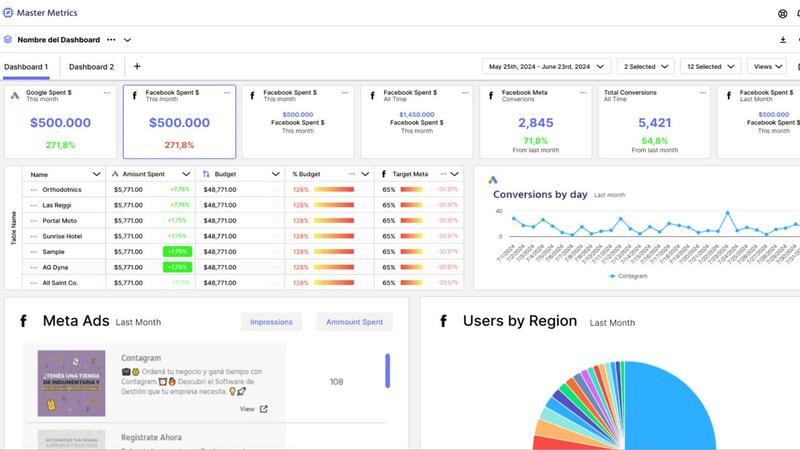
Master Metrics turns your data into smart dashboards and automated alerts for effortless, data-driven decisions.
Last updated: February 28, 2026

Trafficclaw
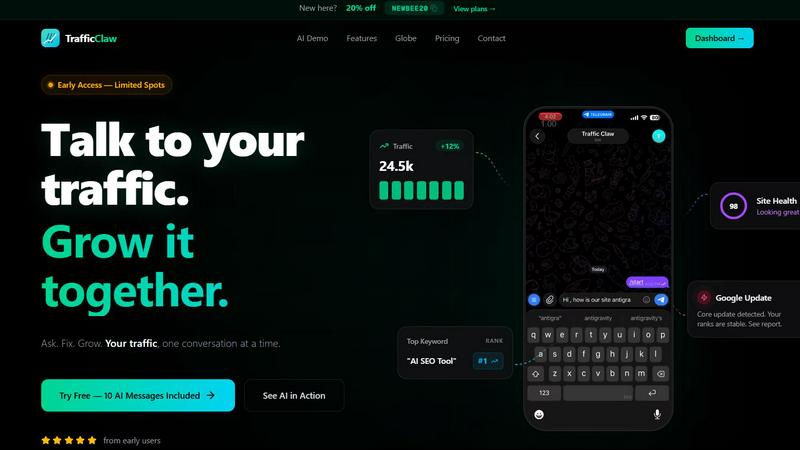
TrafficClaw is an AI analyst that answers questions and delivers growth insights from your live SEO and analytics data.
Last updated: April 13, 2026
Visual Comparison
Master Metrics
Trafficclaw
Feature Comparison
Master Metrics
Unified Data Overview & Control Panel
Gain immediate visibility into all client accounts from a single, customizable dashboard. The Overview Control Panel highlights what needs your attention, allowing you to merge data from all connected sources, add custom data points, and use formulas to create a comprehensive, at-a-glance status report for your entire portfolio, streamlining daily management.
AI-Powered Presentation & Report Generation
Create client-ready Google Slides presentations in just a few clicks. Simply select your data sources, key metrics, and a design template. Master Metrics' AI then automatically generates a fully editable, professional presentation, dramatically reducing the time spent on manual report compilation and enabling you to deliver insights with impactful visual storytelling.
Custom Alerts & Automated Budget Control
Set intelligent, proactive alerts for any metric across your connected platforms. Get notified via email, WhatsApp, or Slack when campaigns underperform, sales drop, or goals are at risk. Crucially, control daily ad spend to hit monthly budgets automatically, receiving alerts when you deviate from your target, ensuring financial oversight is continuous and effortless.
Seamless Integrations & Data Connectors
Connect your marketing data from various ad networks and social platforms, with automatic refresh schedules. Furthermore, Master Metrics allows you to extract and merge this live data directly into Google Sheets and Looker Studio, fitting seamlessly into your existing workflow and extending its power to your favorite analysis and visualization tools.
Trafficclaw
AI Analyst Chat
This is the core of TrafficClaw. Engage in natural language conversation with an AI trained on your live analytics and SEO data. Ask specific questions about traffic trends, user behavior, or performance drops. The AI doesn't offer blog-style advice; it analyzes your connected data sources and delivers precise verdicts with evidence, often accompanied by charts and direct insights for immediate action.
SEO Intelligence Suite
Go beyond basic rankings. This feature proactively monitors your SEO health with advanced capabilities. It detects keyword gaps you can target, alerts you to content decay on older pages, identifies cannibalization issues where your pages compete against each other, and provides tools optimized for AI search engines. It turns raw search data into a strategic growth roadmap.
Integrated Analytics Dashboard
TrafficClaw unifies critical metrics into a single, intelligently designed overview. View real-time visitor counts, traffic trends, bounce rates, and conversion funnels side-by-side with your SEO data. This eliminates the need to constantly jump between GA4, Search Console, and other platforms, providing a holistic view of your site's performance in one glance.
Live Visitor Globe & Embed
A unique visual feature that displays your real-time GA4 traffic on an interactive 3D globe. See where your current visitors are located globally, with a live activity feed showing page views and exits. You can also generate an embed code to showcase this live globe on your own website, adding dynamic social proof without any additional tracking scripts.
Use Cases
Master Metrics
Agency Client Reporting & Dashboard Sharing
Marketing agencies can clone dashboard templates for new clients in one click, then share live performance insights via secure public links, scheduled PDF email reports, or embedded views. This provides transparent, professional reporting that strengthens client relationships and saves dozens of manual hours each month.
Cross-Channel Performance Analysis
Marketers managing campaigns across Google Ads, Meta, LinkedIn, and other platforms can use custom metrics and formulas to blend data from these different sources. This answers complex business questions like true blended ROI or cross-channel customer journey effectiveness, which is impossible when data is siloed.
Proactive Campaign & Budget Management
Teams can set up alerts for specific KPIs like cost-per-acquisition (CPA) or conversion rate thresholds. Combined with daily budget pacing alerts, this allows for real-time campaign optimization. Managers are notified of issues immediately, enabling swift corrective action before budget is wasted or performance declines.
Rapid Pitch & Performance Review Creation
Freelancers and sales teams can leverage the AI Slides feature to quickly generate data-backed presentations for new client pitches or quarterly reviews. By pulling in live or historical data, they create compelling, customized narratives that demonstrate potential value or past results with professional polish and minimal effort.
Trafficclaw
Diagnosing Sudden Traffic Drops
When your analytics show an unexplained traffic decline, instead of manually cross-referencing data for hours, simply ask the AI Analyst "Why did my traffic drop?" It will analyze your connected GA4 and Search Console data, pinpointing causes such as a Google algorithm update impact, a specific page losing rankings, or a technical issue, and provide the evidence-backed reason.
Uncovering Content & Keyword Opportunities
Identify growth levers without manual research. Ask questions like "What are my top untapped keyword opportunities?" or "Which old blog posts need updating?" The AI sifts through your search performance data to highlight content gaps, pages suffering from decay, and high-potential keywords you're not yet ranking for, directing your content efforts effectively.
Real-Time Website Performance Monitoring
Keep a pulse on your site's immediate activity and health. Use the unified dashboard to watch real-time visitor flow, geographic distribution, and on-site behavior concurrently with core SEO metrics. This is invaluable for monitoring campaign launches, site changes, or immediate reactions to industry news.
Streamlining Client or Stakeholder Reporting
For agencies or teams, TrafficClaw simplifies communication. The clear, conversational insights and visual dashboard provide an easily digestible snapshot of performance. You can quickly generate answers to specific stakeholder questions or use the live embed globe to transparently showcase site activity and engagement directly to clients.
Overview
About Master Metrics
Master Metrics is an all-in-one management platform engineered specifically for the complex needs of marketing agencies and teams. Born from deep experience within digital marketing agencies, it directly tackles the fragmentation of data across countless ad networks and marketing sources. The platform's core mission is to maximize marketing and sales results by transforming scattered data into a single source of truth. It empowers users, from solo freelancers to large agency teams, to make confident, data-driven decisions without the manual hassle. By aggregating key metrics into smart dashboards, enabling custom calculations across data sources, and providing powerful automation for reporting and alerts, Master Metrics simplifies analytics. This allows professionals to focus on what matters most: optimizing campaigns, controlling budgets, enhancing performance, and demonstrating clear value to clients through intelligent insights and stunning, AI-generated presentations.
About Trafficclaw
TrafficClaw is an AI-powered analytics command center designed to cut through the noise of traditional data tools. It transforms the complex, often frustrating task of understanding website performance into a simple conversation. By connecting directly to your Google Analytics 4 and Google Search Console accounts, TrafficClaw provides an AI analyst with real-time access to your data. Instead of staring at static graphs and exporting spreadsheets, you can ask direct questions like "Why did my traffic drop last Tuesday?" or "What are my top keyword opportunities?" and receive specific, actionable verdicts backed by your own metrics. It's built for website owners, marketers, and developers who value their time and seek direct, intelligent insights over generic advice. The core promise is effortless growth: stop switching between tabs, start having a dialogue with your data, and get clear fixes to drive your traffic forward.
Frequently Asked Questions
Master Metrics FAQ
What data sources can I connect to Master Metrics?
Master Metrics integrates with a wide array of major ad networks and marketing platforms, including Google Ads, Meta Ads, LinkedIn, and more. The platform also offers powerful connectors to push your merged data into Google Sheets and Looker Studio, centralizing information from across your marketing stack for a unified view.
How does the AI Slides feature work?
You select the client account, choose specific metrics and goals you want to highlight, and pick a design template. Master Metrics' AI then analyzes the selected data and automatically generates a complete, editable Google Slides presentation. This includes charts, insights, and visualizations, providing a professional starting point you can further customize.
Can I control alerts for budget pacing?
Yes, this is a core functionality. You can set alerts to monitor your daily spend against a monthly budget. The system can notify you every time you are above or below a specific percentage of your calculated daily budget target, giving you precise control and preventing overspend or underspend across your campaigns.
Is there a limit to the number of dashboards I can create?
Dashboard limits are based on your chosen subscription plan. Plans range from the Freelancer tier to Pro Plus tiers, with increasing numbers of allowed client accounts and included features. You can clone and customize dashboards for each connected account within your plan's limits, facilitating scalable client management.
Trafficclaw FAQ
How does TrafficClaw access my data?
TrafficClaw uses secure, read-only Google OAuth to connect to your Google Analytics 4 and Search Console accounts. This means we never see your password, and our access is limited to viewing your analytics data only. Your data remains in your Google account and is not sold or used for training public AI models.
What makes the AI advice different from generic tips?
The AI Analyst is fundamentally different because it operates on your live, first-party data. Instead of giving general best practices, it analyzes your specific traffic patterns, keyword rankings, and user behavior to deliver personalized verdicts. The insight "your traffic dropped because page X lost its #3 ranking for keyword Y" is actionable, whereas "create better content" is not.
Is there a setup or coding required?
Setup takes less than a minute and requires no coding. You simply sign in with Google, grant read-only permissions to your GA4 and Search Console properties, and TrafficClaw auto-detects and imports your data. Your dashboard and AI Analyst are ready to use immediately after.
Can I use the Live Globe on my website?
Yes. The Live Visitor Globe is a feature available to all users. You can generate a unique embed code from your TrafficClaw dashboard and insert it as a simple iframe into any webpage, CMS like WordPress, or custom-coded site. It will then display real-time visitor data from your connected GA4 property without requiring any additional tracking code on your site.
Alternatives
Master Metrics Alternatives
Master Metrics is a comprehensive marketing analytics platform designed for agencies and marketing teams. It centralizes data from multiple ad networks into a single dashboard, providing tools for analysis, automated alerts, and insightful reporting to drive smarter campaign decisions. Users often explore alternatives for various reasons, such as budget constraints, specific feature requirements, or the need for a platform that better aligns with their team's size or technical stack. The search for the right tool is a natural part of finding the optimal fit for unique business workflows and goals. When evaluating other solutions, consider core capabilities like data source integrations, the ease of creating custom reports and dashboards, and the sophistication of alerting systems. The ideal platform should not only consolidate data but also transform it into actionable insights that directly improve marketing performance and client outcomes.
Trafficclaw Alternatives
Trafficclaw is an AI assistant for SEO and analytics, designed to translate complex data into actionable insights. It connects to platforms like Google Analytics and Search Console, allowing users to ask direct questions about their traffic and performance to receive clear, data-backed answers. Users explore alternatives for various reasons, such as budget constraints, the need for different feature sets, or integration with a broader tech stack. Some may require more advanced reporting, team collaboration tools, or support for additional data sources beyond the core offerings. When evaluating other solutions, prioritize tools that offer genuine conversational analysis, not just dashboards. Look for robust, secure data connections, transparent pricing, and a focus on delivering specific, corrective insights rather than just surfacing problems.