
Bantr: Offline & Unlimited TTS for Mac vs Prompt Builder
Side-by-side comparison to help you choose the right AI tool.

Bantr: Offline & Unlimited TTS for Mac
Bantr is a private, unlimited text-to-speech app for Mac that works entirely offline.
Last updated: February 28, 2026

Prompt Builder
Prompt Builder instantly crafts and refines AI prompts for any model, saving you time and boosting results.
Last updated: April 13, 2026
Visual Comparison
Bantr: Offline & Unlimited TTS for Mac

Prompt Builder
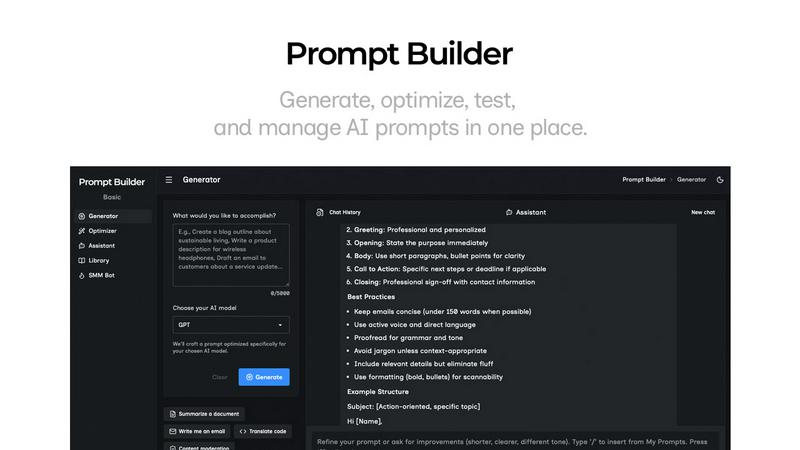
Feature Comparison
Bantr: Offline & Unlimited TTS for Mac
Truly Private & Offline Operation
Bantr is engineered for complete data sovereignty. Unlike cloud-based TTS services that process your text on remote servers, Bantr performs all synthesis locally on your Mac using Apple's MLX framework. This guarantees that your scripts, documents, and generated audio never traverse the internet. There is no data collection, no privacy policy loopholes, and no risk of your content being used to train corporate AI models. Your creative work remains exclusively yours, from input to output.
Unlimited Access with One-Time Purchase
Liberate yourself from the constraints of monthly subscriptions and usage quotas. Bantr operates on a simple, transparent model: pay once and own it for life. This grants you unlimited generations across all available voices without any hidden fees or tiered plans. It's a sustainable investment for your creative toolkit, providing predictable costs and the freedom to experiment and produce content at any scale without worrying about hitting a limit.
Expressive Library of 150+ Voices
Discover a rich and versatile palette of over 150 natural-sounding voices. This extensive library is designed to cater to a wide array of projects and tones, from professional narrations and friendly tutorials to character voices for animations and games. Each voice is optimized for clarity and expressiveness, providing you with the nuanced audio quality needed for engaging and professional results, all generated instantly on your local hardware.
Compelling Future Roadmap
Your purchase is an investment in a continuously evolving tool. The developer has outlined an exciting roadmap based on user feedback, promising significant value-added features. Planned updates include the ability to clone custom voices from short audio samples, upload and narrate documents directly (PDFs, EPUBs, DOCX), generate dialogues with multiple speakers in a single file, and add support for additional languages. Bantr is built to grow with your needs.
Prompt Builder
Prompt Generator
The Prompt Generator is your starting point for crafting exceptional prompts. Simply describe your task or idea in natural language and select your target AI model (e.g., Gemini, Claude, GPT-4). The engine then creates a professional-grade, model-tuned prompt draft that incorporates optimal structure, constraints, and output formatting specific to that model. This foundational feature ensures you begin with a strong, tailored foundation rather than a generic template, dramatically increasing the likelihood of a successful output on the first attempt.
Prompt Assistant & Chat Workspace
This integrated chat environment allows you to test and refine prompts without ever leaving Prompt Builder. Run your generated or saved prompts directly within the Assistant, which supports a wide range of models including Grok, Gemini, GPT, and DeepSeek. Iterate with follow-up questions, adjust instructions on the fly, and see real-time results. The chat history is preserved, enabling fast iterations and preventing the loss of successful dialogue paths. It consolidates testing and refinement into a single, organized workspace.
Prompt Optimizer
The Optimizer tool elevates existing prompts to their highest potential. Paste any prompt—whether from an external source or your own Library—and the Optimizer will analyze and enhance it. It provides structured improvements focused on clarity, adding necessary constraints, defining output formats, and suggesting examples. Each optimization is saved in a history log, and you can pin favorite versions. With one click, you can run the optimized prompt in the Assistant to immediately validate the improvements.
Prompt Library & Community Templates
Build a personal repository of your most effective prompts with the Prompt Library. Save, pin, categorize, and search your curated collection for easy reuse across projects and teams. Beyond your private library, explore a growing collection of Community Prompts and templates contributed by other users. This feature transforms isolated successes into a scalable, organizational asset, ensuring you never lose a "good version" and can continuously build upon proven prompt strategies.
Use Cases
Bantr: Offline & Unlimited TTS for Mac
Professional Video & Tutorial Production
Content creators and educators can efficiently produce high-quality voiceovers for YouTube videos, online courses, and software tutorials. Bantr's natural voices and offline workflow allow for rapid iteration and production without compromising audio quality or dealing with subscription limits. Generate clear, engaging narration that keeps audiences focused on your content, not on robotic delivery.
Accessible Content Creation
Transform written content into audio formats to enhance accessibility and reach wider audiences. Bloggers, writers, and publishers can easily create audio versions of articles, newsletters, and books. This is also a powerful tool for individuals with dyslexia or visual impairments, allowing them to listen to digital text privately and securely, directly on their device.
Game Development & Animation
Indie developers and animators can bring their characters to life with unique voices without the cost of hiring voice actors for every line. Bantr's diverse voice library allows for casting different personalities, and the upcoming multi-speaker dialogue feature will streamline the process of creating conversational scenes, all while keeping assets and scripts confidential during development.
Product Demos & Professional Presentations
Create polished, professional voiceovers for product demonstration videos, sales pitches, and internal training materials. The ability to work offline ensures you can craft and finalize audio in any environment, whether in a studio, at a client site, or on the go. The one-time cost model makes it a cost-effective solution for startups and businesses.
Prompt Builder
Content Creation & Marketing
Writers and marketers can rapidly generate and refine prompts for blog outlines, marketing copy, social media posts (via the dedicated SMM Bot), and product descriptions. The ability to tune prompts for different tones and platforms—and save successful formulas—turns a creative brainstorming session into a repeatable, efficient content production pipeline, ensuring brand consistency and quality.
Software Development & Technical Writing
Developers and technical writers use Prompt Builder to create precise prompts for code generation, debugging, documentation, and API explanation. The model-specific tuning ensures that prompts leverage each AI's strengths (e.g., Claude's long-context reasoning or GPT's code proficiency), leading to more accurate, usable code snippets and technical explanations with fewer errors and revisions.
Research & Data Analysis
Academics, analysts, and students can craft sophisticated prompts for literature reviews, data summarization, hypothesis generation, and complex querying. The iterative chat workspace allows for deep dives into topics, following chains of thought, and refining questions based on initial outputs. Saving these research-focused prompts creates a valuable knowledge base for ongoing projects.
Business Operations & Productivity
Professionals across functions—from HR crafting job descriptions to sales generating outreach emails—can systematize their AI interactions. Prompt Builder allows teams to develop, optimize, and share standardized prompts for common operational tasks, ensuring efficiency, reducing prompt engineering overhead for non-experts, and maintaining a high standard of output across the organization.
Overview
About Bantr: Offline & Unlimited TTS for Mac
Bantr redefines text-to-speech for the Mac by placing power, privacy, and performance directly into your hands. It is a revolutionary application built exclusively for Apple Silicon Macs, leveraging Apple's own MLX framework to generate expressive, natural-sounding audio entirely on your device. This fundamental architecture means Bantr operates completely offline, eliminating the need for cloud servers, internet connections, or external subscriptions. Your data never leaves your computer, ensuring complete privacy and security. With a single, one-time purchase, users unlock unlimited access to a diverse library of over 150 high-quality voices. Designed for creators, educators, developers, and professionals, Bantr is the definitive tool for producing studio-quality voiceovers for any project. It promises a future of continuous, user-driven evolution, with a compelling roadmap that includes features like custom voice cloning and multi-speaker dialogues. Bantr is more than software; it's a commitment to private, unrestricted, and high-fidelity audio creation.
About Prompt Builder
Prompt Builder is a dedicated workspace designed to transform the art and science of prompt engineering from a time-consuming chore into a streamlined, efficient process. It serves as a central hub for professionals, creators, and teams who rely on multiple AI models—such as GPT, Claude, Gemini, Llama, and Mistral—to generate high-quality outputs. The core value proposition is simple: stop rewriting prompts and start getting consistent, superior results. Instead of manually crafting and adapting instructions for each unique model, users describe their task in plain English. Prompt Builder then generates a model-optimized draft, provides a chat environment for iterative refinement, and offers robust tools for saving, organizing, and reusing perfected prompts. This eliminates the friction of jumping between applications, losing valuable versions in endless chat threads, and wasting tokens on subpar retries. It’s the definitive solution for turning a fleeting idea into a reliable, production-ready prompt in seconds.
Frequently Asked Questions
Bantr: Offline & Unlimited TTS for Mac FAQ
What are the system requirements for Bantr?
Bantr requires macOS 15 (Sequoia) or above and is built exclusively for Macs with Apple Silicon chips (M1, M2, M3, M4, M5, and future iterations). It leverages the neural engine in these processors for efficient, local speech synthesis. It will not run on Intel-based Macs or older versions of macOS.
How does the lifetime license and updates work?
The one-time purchase grants you a lifetime license to use Bantr on your Mac. This includes all future updates and feature additions at no extra cost. The developer is committed to enhancing the app based on the published roadmap and user feedback, ensuring your investment continues to grow in value over time.
Is there really no data sent to the cloud?
Correct. Bantr is designed as a fully offline application. All text processing and audio generation occur locally on your Mac using Apple's MLX framework. No text input, generated audio, or any other data is ever sent to external servers. Your privacy is structurally guaranteed by the app's architecture.
What is the refund policy?
The purchase is backed by a 7-day money-back guarantee. If you are not satisfied with Bantr for any reason, you can request a full refund within one week of your purchase. This allows you to test the software's capabilities and compatibility with your workflow risk-free.
Prompt Builder FAQ
What AI models does Prompt Builder support?
Prompt Builder is designed as a universal prompt workspace. It supports prompt generation and optimization for a wide array of leading models including OpenAI's GPT series, Anthropic's Claude, Google's Gemini, Meta's Llama, Mistral AI, DeepSeek, xAI's Grok, Perplexity, and Cohere. The integrated Assistant allows you to run and chat with many of these models directly within the platform.
How does the free plan work?
The free plan offers full access to the Prompt Generator, Optimizer, and Library features. It includes 25 Assistant requests per month, allowing you to test and run prompts within the platform using supported models at no cost and without requiring a credit card. This is ideal for individuals exploring the tool or with light usage needs.
Can I use prompts created in Prompt Builder elsewhere?
Absolutely. Prompts you create, refine, and save in your Library are yours to use. You can copy any prompt and use it in your preferred AI chat interface (like ChatGPT or Claude's website), in automation workflows via API, or share them with your team. Prompt Builder enhances the prompt's quality and structure, but you own the final output.
How does the model-specific tuning work?
When you select a target model in the Prompt Generator, the system applies best practices and known structural preferences for that specific model. This goes beyond simple keyword substitution; it adjusts the prompt's framing, instruction placement, constraint formatting, and desired output style to align with how that particular model has been trained to respond most effectively, leading to higher quality and more reliable results.
Alternatives
Bantr: Offline & Unlimited TTS for Mac Alternatives
Bantr: Offline & Unlimited TTS for Mac is a premium text-to-speech application that stands out in the AI assistant category for its commitment to privacy and a one-time purchase model. It delivers high-quality, natural voiceovers entirely offline, making it a compelling choice for Mac users who value data security and unlimited usage. Users often explore alternatives for various reasons. Some may seek different pricing structures, such as free tiers or subscription-based models with different feature sets. Others might require specific platform compatibility, voice libraries, or advanced functionalities like voice cloning that may be in development elsewhere. The search for the right tool is highly personal and project-dependent. When evaluating options, consider your core needs. Prioritize factors like cost transparency, the quality and variety of available voices, and whether offline operation is essential for your workflow. Also, assess the long-term value, including update policies and the developer's roadmap, to ensure the tool evolves with your requirements.
Prompt Builder Alternatives
Prompt Builder is a dedicated prompt engineering workspace designed to streamline the entire lifecycle of AI prompts, from initial idea to deployment. It falls within the category of AI Assistants, specifically focusing on the craft and management of instructions for large language models. Users often seek alternatives for various reasons, including budget constraints, the need for different feature sets, or integration with a specific platform or workflow. When evaluating other solutions, it's crucial to consider your core requirements. Key factors include the range of supported AI models, the sophistication of testing and optimization tools, and the ability to organize and reuse prompts effectively. The ideal platform should enhance your productivity without adding complexity, turning prompt engineering from a chore into a strategic advantage.